AI · 2.5.2 Reference Images
Reference Images with Flux.2 Klein and Flux.3 Klein
One principle, two wirings, the same prompt.
One principle, two models
Both models read reference images through the fourth way described in 2.5.1. The reference passes through the VAE, the same encoding as the new image, and sits in the conditioning next to the prompt. The sampler starts on an empty canvas. The image is created fresh; the reference is read, not painted over.
Three rules follow from this, and they apply to both models. The reference belongs in the conditioning, never in the sampler's latent. There it would be img2img, and the image would be painted over. It is attached to the positive and the negative conditioning. And what role it plays is decided by the prompt.
The prompt is the same too. It runs unchanged on both models. Compared with 2.5.1, only the outfit is different: instead of the leather jacket she wears a grey one-shoulder sweater, again from the prompt alone. Flux.2 Klein addresses references as Figure 1 and Figure 2, the official Flux.3 Klein template as <ref_image_0> and <ref_image_1>. In my test, Flux.3 Klein did not care which form the prompt used. The difference image showed only deviations in detail, mostly in the pattern of the pants. I tested this with two clearly different references, a person and a pair of pants. Whether the naming matters with two references of the same kind, two people for instance, is still open.
Show prompt · JSON +
{
  "image_type": "full-length commercial studio fashion photograph",
  "references": {
    "Figure 1": "identity of the woman: face, hair, skin, freckles",
    "Figure 2": "the cargo pants: fabric"
  },
  "subject": {
    "who": "the woman from Figure 1",
    "body": "slim and trained",
    "expression": "neutral and editorial",
    "head": "lifted chin",
    "pose": "relaxed contrapposto: weight on one leg, the other knee slightly bent, shoulders turned a little away from the camera, one hand loosely in a pant pocket, the other arm hanging naturally",
    "feet": "bare feet, no shoes",
    "priority": 1
  },
  "wardrobe": {
    "sweater": {
      "description": "oversized wide grey one-shoulder knit sweater with a loose, chunky rib texture",
      "fit": "loosely slung, as if it has slipped: the frame-left shoulder and collarbone are bare, the knit rests softly on the frame-right shoulder",
      "length": "ends at the hips, the hem falling loosely over the waistband",
      "priority": 1
    },
    "pants": {
      "reference": "Figure 2",
      "cut": "barrel-cut camouflage cargo pants: legs curve outward from the hips, widest at the knee, and taper slightly toward the hem",
      "fit": "baggy, very loose",
      "rise": "worn low on the hips",
      "priority": 1
    }
  },
  "interactions": [
    "the soft key light brings out the rib texture of the knit and falls evenly on the bare shoulder",
    "the wide pant legs fall to the floor and rest on the bare feet"
  ],
  "setting": {
    "backdrop": "seamless pale grey studio backdrop",
    "priority": 3
  },
  "lighting": {
    "key": "large soft diffused key light",
    "priority": 2
  },
  "style": {
    "palette": "neutral",
    "quality": "clean high-end fashion catalogue",
    "priority": 2
  }
}
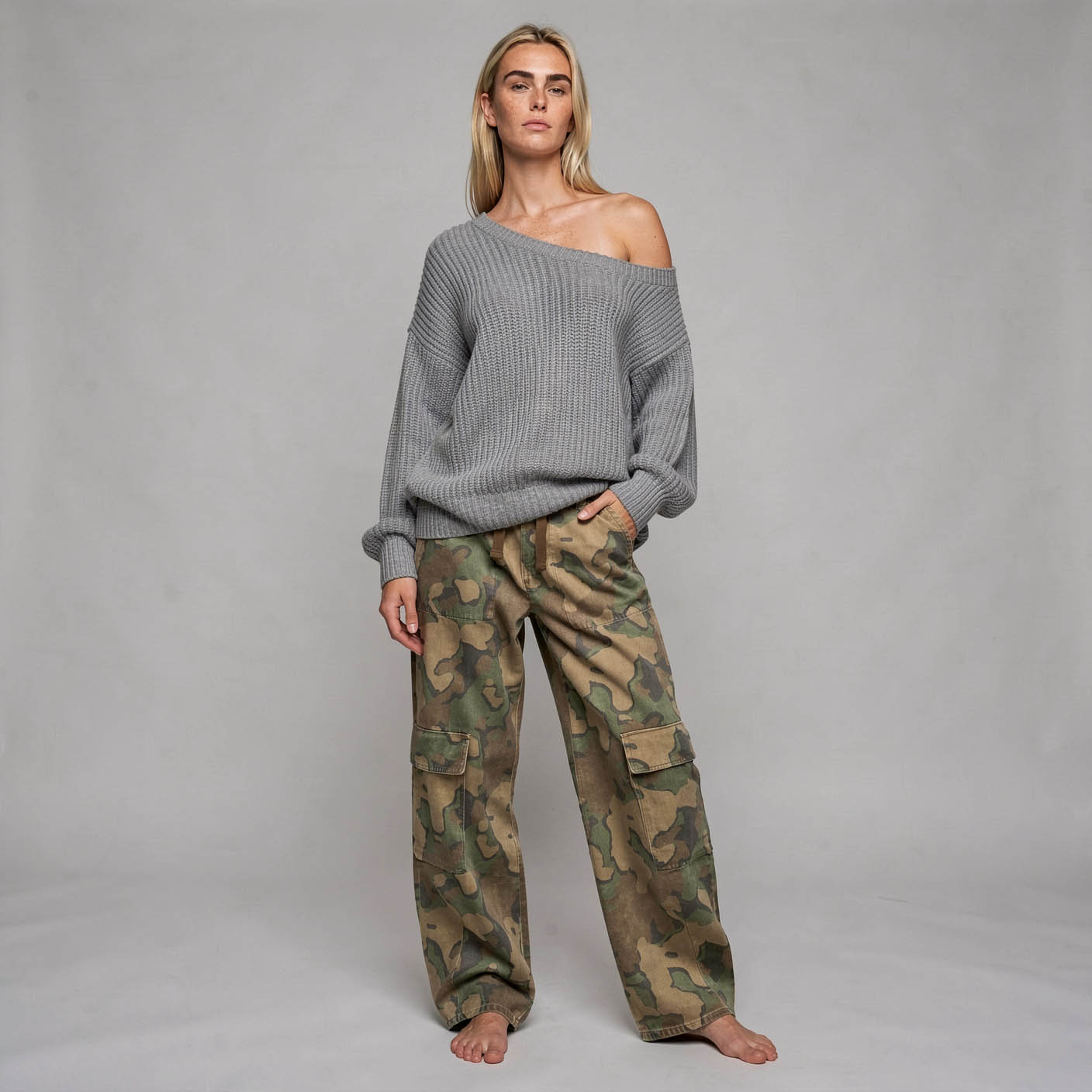
Flux.2 Klein 9B · 1024 × 1024 · 4 Steps
Where the prompt reaches its limit
The sweater comes from the prompt alone, and that is exactly where the limit shows. It sits on one shoulder, as described. But the ribs run diagonally and evenly, and the hem stays straight. A sweater that had really slipped would pull. The model took over the shape, not the movement. With a reference image for the sweater, this would probably look different. The side is not reliable either. Both models often swapped left and right from the prompt.
Getting this far took many attempts. Every change to the prompt shifted not only the sweater but also something that had already been right. Whoever revises a prompt always changes the whole image.
Something else got lost along the way that on 2.5.1 still came from the reference alone: the camouflage pattern. With the sweater in the prompt, the pants came out without a pattern; only the word "camouflage" brought it back. The reference delivers what can be seen in it. How strongly it prevails, however, depends on the rest of the prompt. Whatever matters about the product therefore belongs in the prompt as well, even if it is clearly visible in the reference.
Flux.2 Klein
Flux.2 Klein comes in two sizes, 4B and 9B, and in two forms, distilled and base. For references, only the distilled form will do. With it, both sizes read reference images without an additional model.
Caution · Base
The undistilled base variant ignores references completely. There is no error message, and the image looks correct. With the same seed, the image came out pixel-identical with and without a reference.
Wiring
Each reference passes through three nodes: Load Image, Image Scale To Total Pixels at 1 megapixel, and VAE Encode. The latent goes into a ReferenceLatent node, which attaches it to the conditioning. Each reference needs two of them, one in the positive chain and one in the negative chain, which comes from Conditioning Zero Out. Further references are simply appended in both chains.
The order determines the name. The first reference is Figure 1, the second Figure 2. Other phrasings such as "reference image one" were not reliably assigned by the model in my tests.
Sampling uses euler, cfg 1 and the Flux2Scheduler. The empty canvas is an Empty Flux 2 Latent.
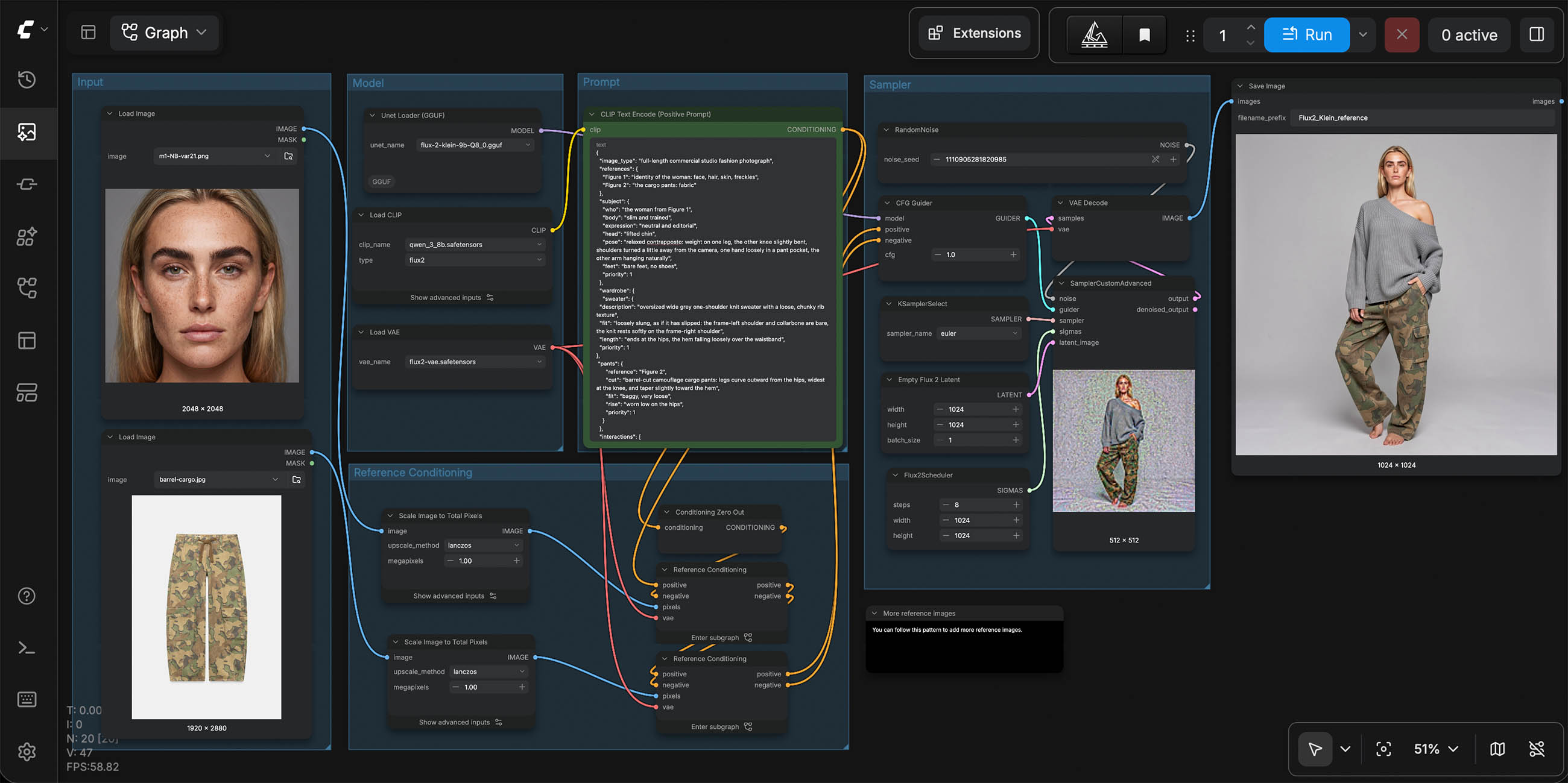
Template trap · Image format
In the official ComfyUI template, the canvas size is tied to Figure 1 via Get Image Size. The image then takes on the format of the portrait. For a fixed format, disconnect this link and set width and height yourself. The downloadable workflow already does this.
Steps
Four steps are enough. In the difference image against eight steps, the differences show mostly in the pattern from Figure 2. Eight steps add marginally more freckles and a little more brilliance, at twice the computing time. My impression is that a larger canvas brings more than more steps. More on this in the Flux.3 Klein section.
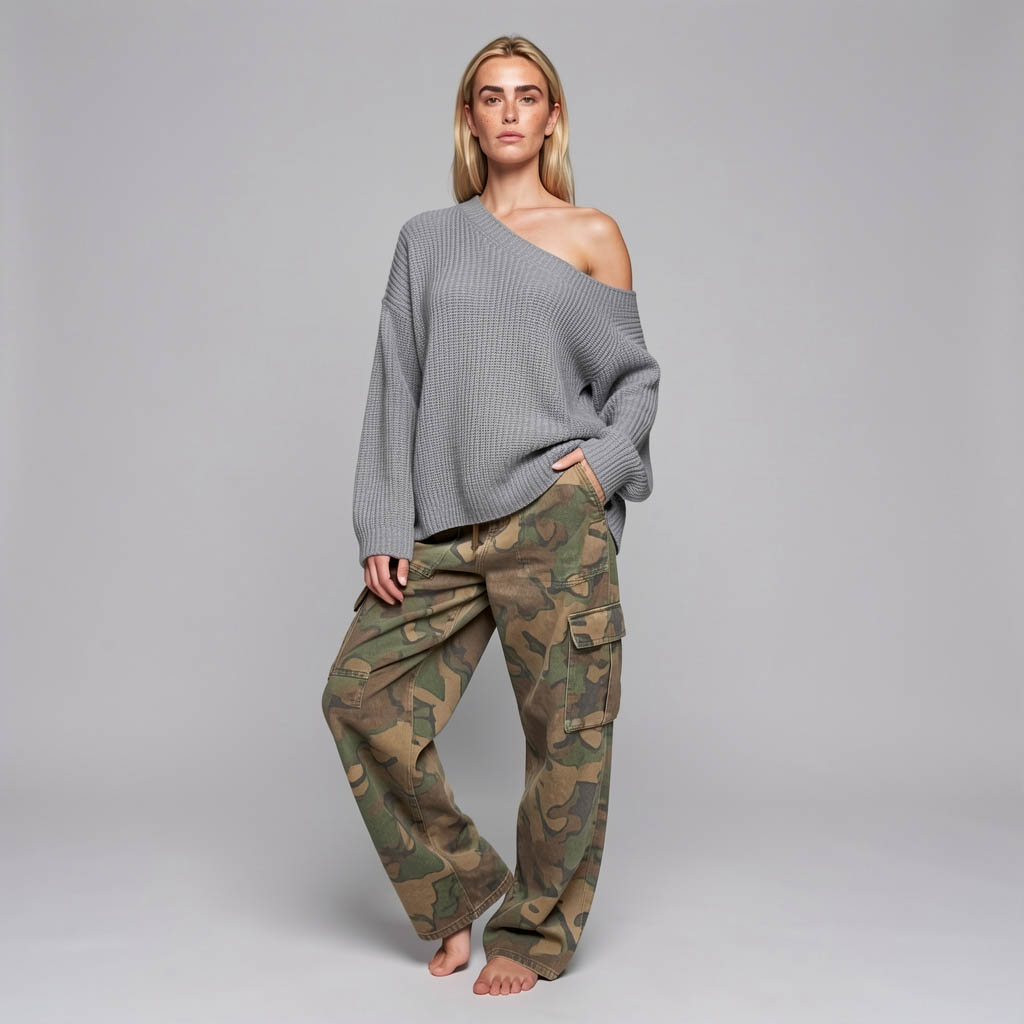
4 steps
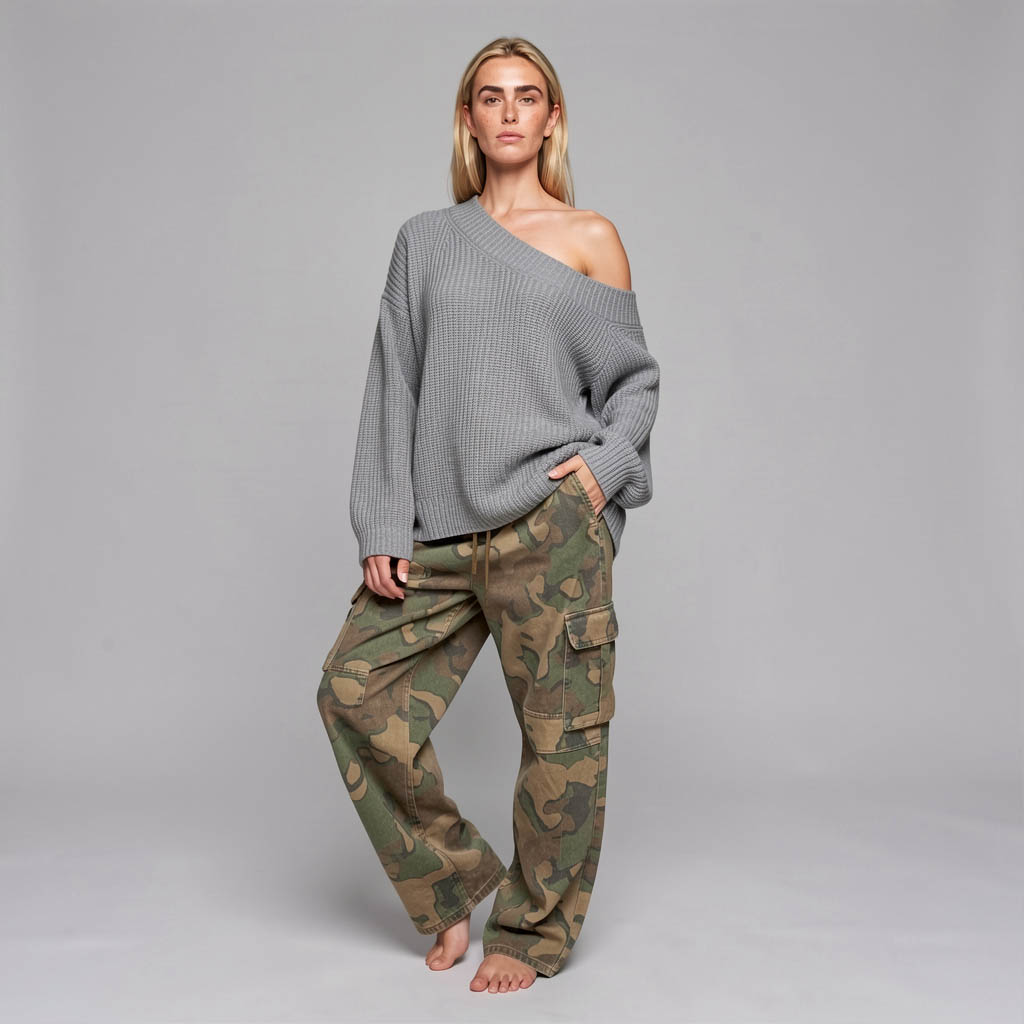
8 steps
The seed rule
The seed holds the composition only as long as model, resolution and steps stay the same. At 1024 × 1024, four and eight steps did not change the pose; at 1408 × 1408 they did. Anyone who has found a pose and then changes resolution or steps starts searching again.
Swapping a reference, by contrast, leaves the composition in place, as the matrix in 2.5.1 shows, with the exception described there. This defines the way of working: find the pose once, then swap people and products within it.
9B on the Pro, 4B on the Air
Flux.2 Klein 9B ran on a MacBook Pro with 64 GB, with the 8B Qwen3 encoder. Flux.2 Klein 4B ran on a MacBook Air with 16 GB, with the 4B Qwen3 encoder as a Q6 GGUF. The smaller model reads the references just the same. But the colors are noticeably paler, and you can tell that model and encoder are much smaller. Fine detail and prompt adherence fall visibly behind 9B. That is down to model size, not the computer. 9B brings a lot more; 4B, in return, runs on 16 GB.
On the Air, the quantized model is faster than the full one. At full size, memory pressure stayed in the red, close to crashing. As Q8 it sits at yellow to orange, also at the limit, but stable. On 16 GB, memory decides the time, not computing power. Q8 is therefore the right choice for the Air.
| Model | Computer | Resolution | Steps | Time |
|---|---|---|---|---|
| Flux.2 Klein 9B · Q8 | MacBook Pro 64 GB | 1024 × 1024 | 4 | 290 s |
| Flux.2 Klein 9B · Q8 | MacBook Pro 64 GB | 1024 × 1024 | 8 | 590 s |
| Flux.2 Klein 9B · Q8 | MacBook Pro 64 GB | 1408 × 1408 | 4 | 867 s |
| Flux.2 Klein 9B · Q8 | MacBook Pro 64 GB | 1408 × 1408 | 8 | 1670 s |
| Flux.2 Klein 4B · bf16 | MacBook Air 16 GB | 1024 × 1024 | 4 | 606 s |
| Flux.2 Klein 4B · Q8 | MacBook Air 16 GB | 1024 × 1024 | 4 | 351 s |
| Flux.2 Klein 4B · Q8 | MacBook Air 16 GB | 1024 × 1024 | 6 | 396 s |
| Flux.2 Klein 4B · Q8 | MacBook Air 16 GB | 1024 × 1024 | 8 | 514 s |
Two references at 1 MP each · all times measured warm
On 16 GB, close browser tabs with live content before rendering: messengers such as WhatsApp Web, video and streaming. Idle applications are not a problem as long as you do not switch to them during the render.
On licensing: Flux.2 Klein 4B is under Apache 2.0 and therefore free for commercial use as well. Flux.2 Klein 9B is under the FLUX Non-Commercial License. The reference workflow thus runs on 16 GB and with a commercially free model.
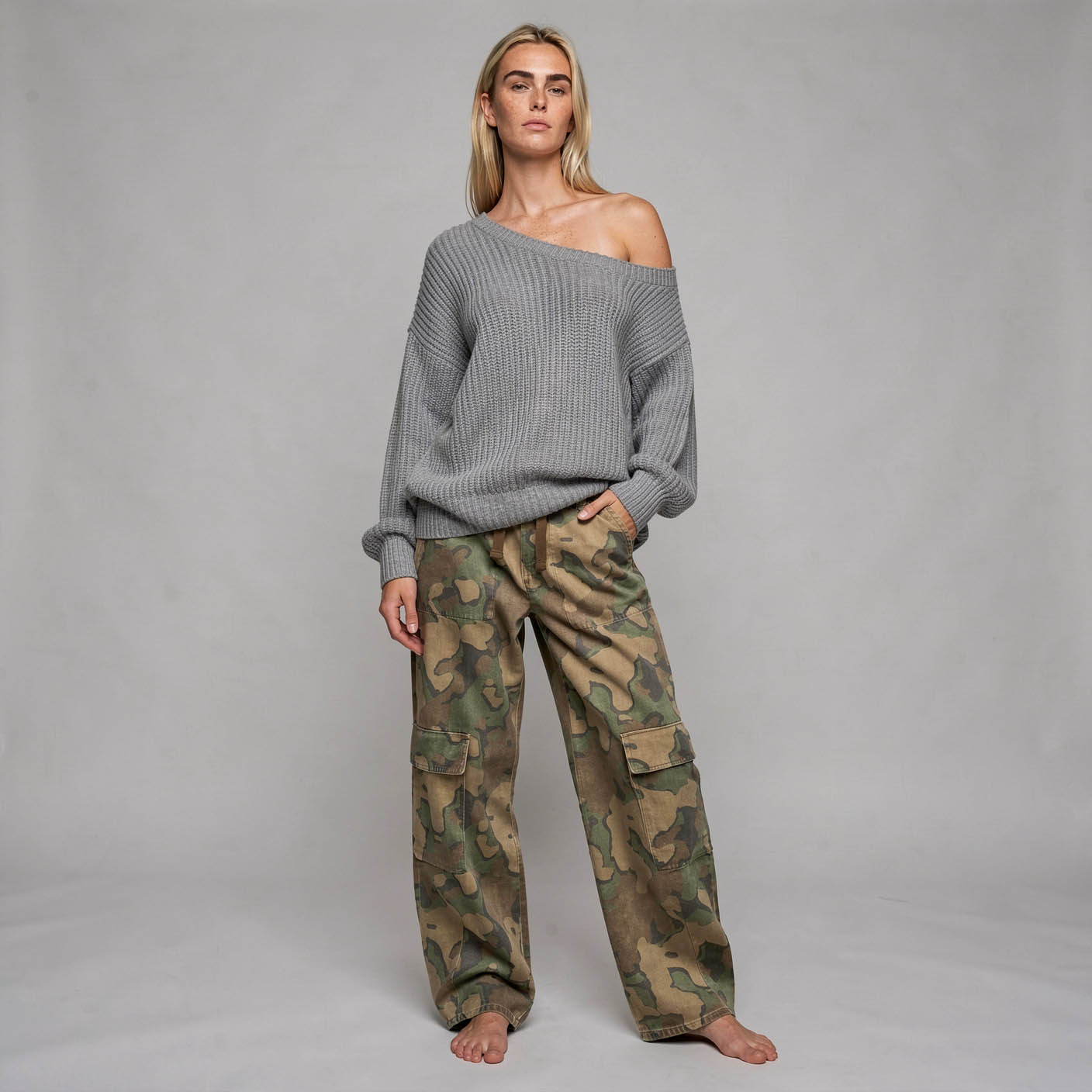
Flux.2 Klein 9B · MacBook Pro
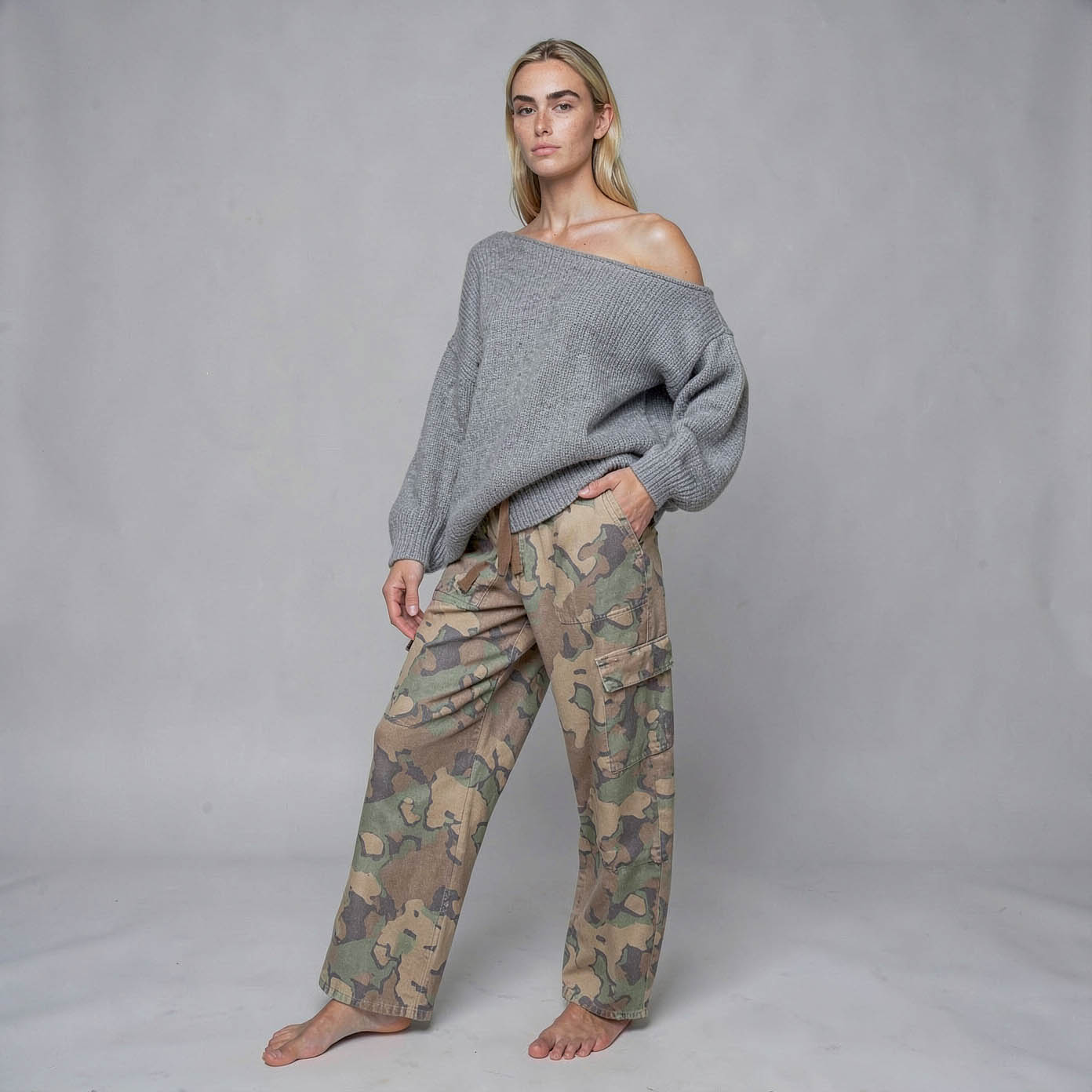
Flux.2 Klein 4B Q8 · MacBook Air
Flux.3 Klein
For Flux.3 Klein, this is a first status: one subject, a few seeds, tested only on the MacBook Pro. The test on the MacBook Air with 16 GB is in progress. The principle is the same, the wiring is different.
Wiring
I use the distilled variant in bf16. The official template ships an int8 version and recommends bf16 from 24 GB of memory. The encoder is Qwen3-VL in 4B, loaded with a CLIP Loader of type flux3. The VAE is the same as for Flux.2 Klein.
Instead of a chain of ReferenceLatent nodes, there is a single node here: Set Reference Multi Latent. It takes the positive and negative conditioning, the VAE and the images, scales each reference to about 1 megapixel, encodes it and attaches it to both chains. Further references go to the next free input. The order determines the name: <ref_image_0>, <ref_image_1> and so on.
The node has a third output, an empty latent the size of the reference. This is the same trap as with Flux.2 Klein. I leave it unused and set the canvas with a separate Empty Flux 2 Latent. Sampling uses a KSampler, 16 steps, cfg 1, euler, scheduler simple.
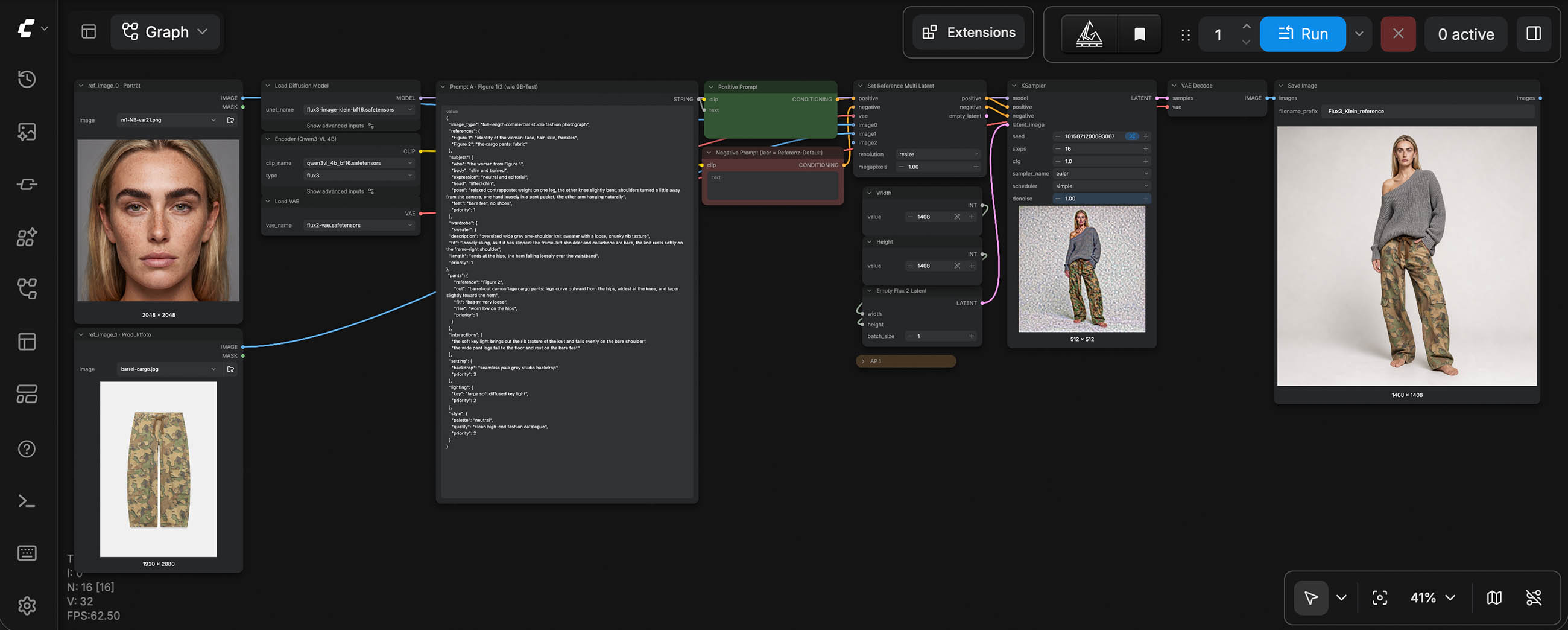
Template trap · Prompt upsampler
The official Flux.3 Klein templates send the prompt through an upsampler by default, a separate language model that rewrites it. In the edit template, the switch for it is wired the other way round: "false" turns it on. Its instruction is to output prose without JSON, coordinates or IDs. A JSON prompt is thus dissolved into running text, and the structure is lost. In my tests, the result became less precise as a consequence. My workflow runs without the upsampler.
Something else stands out in the official edit template: it loads the base variant. With Flux.3 Klein, the base variant therefore presumably reads references, unlike with Flux.2 Klein. I have not tested this. The note in the template gives 50 steps and cfg 3.5 for it; the sampler is set to cfg 1.
First findings
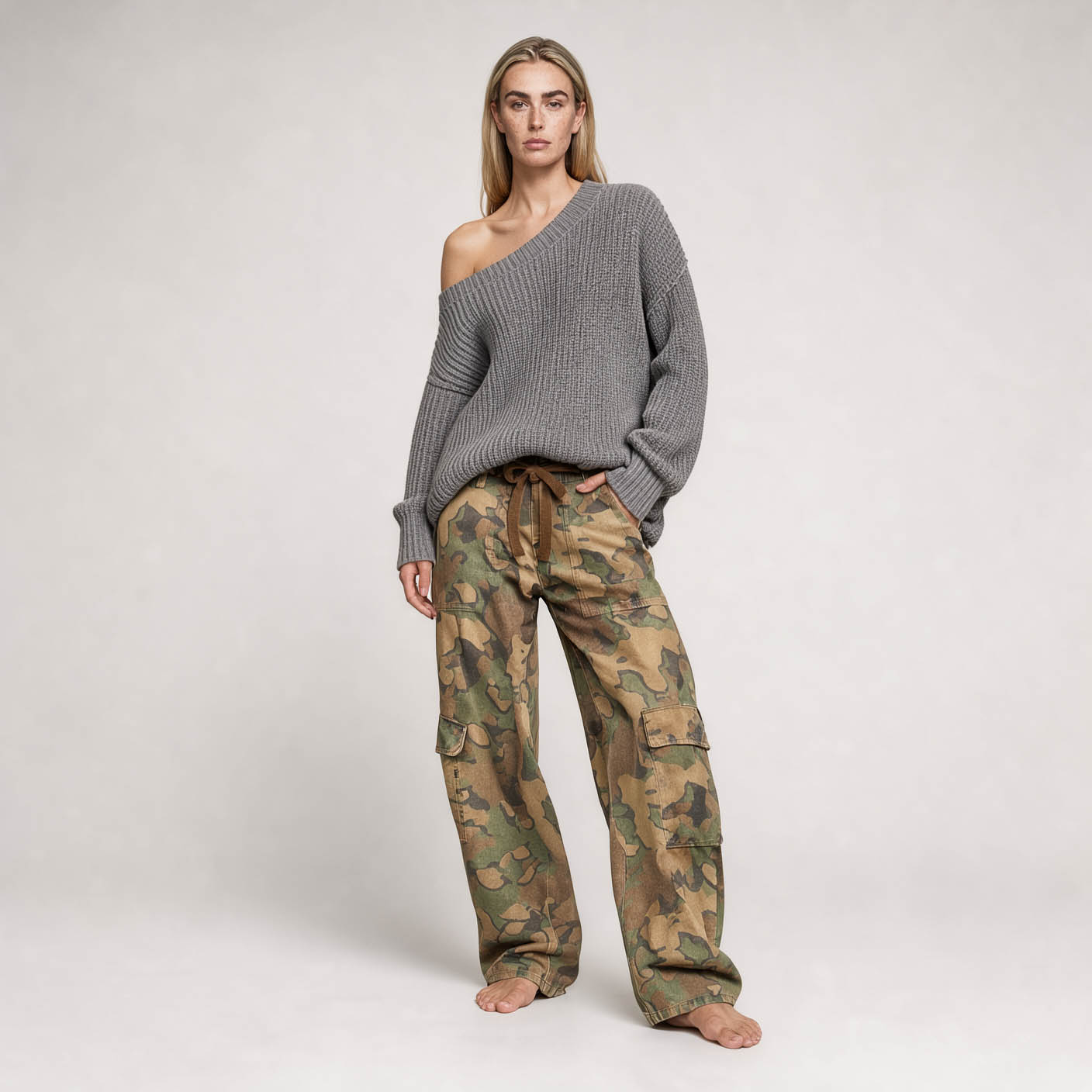
Same prompt, same seed, a different portrait reference. As long as both portraits are oriented similarly, only the woman changes. Pose, sweater and pants stay put. If the portrait is angled, however, Flux.3 Klein rotates the whole figure along with it, not just the head. Flux.2 Klein did take over the same angled reference, but kept the frontal pose from the prompt. Flux.3 Klein weights reference images considerably more strongly.
For identity, I therefore use frontal portraits, as on a comp card, and not cropped too tightly. My impression is that the model gets the proportions right more often when some of the upper body is visible in the portrait. Any stance a reference brings with it otherwise competes with the pose in the prompt, and with Flux.3 Klein the reference tends to win.
At 1024 × 1024 and 16 steps, one image takes about twelve minutes on the Pro, between 710 and 720 seconds. That is a good deal more than twice as long as Flux.2 Klein 9B with four steps. At 1408 × 1408 it is 990 seconds, only about a third more for almost twice the image area. Flux.2 Klein 9B needs 867 seconds there with four steps. At the higher resolution, the two models are thus almost level.
Flux.2 Klein and Flux.3 Klein get considerably better at 1408 × 1408: finer skin, clearer knit, a more relaxed stance. The canvas is simply larger. In a full-length shot, the face takes up only a small part of the image. At 1024 × 1024 few pixels are left for it; at 1408 × 1408 almost twice as many.
With Flux.3 Klein, the higher resolution is even more essential than with Flux.2 Klein, and it costs comparatively little time. My recommendation for Flux.3 Klein is therefore: at least 1408 × 1408.
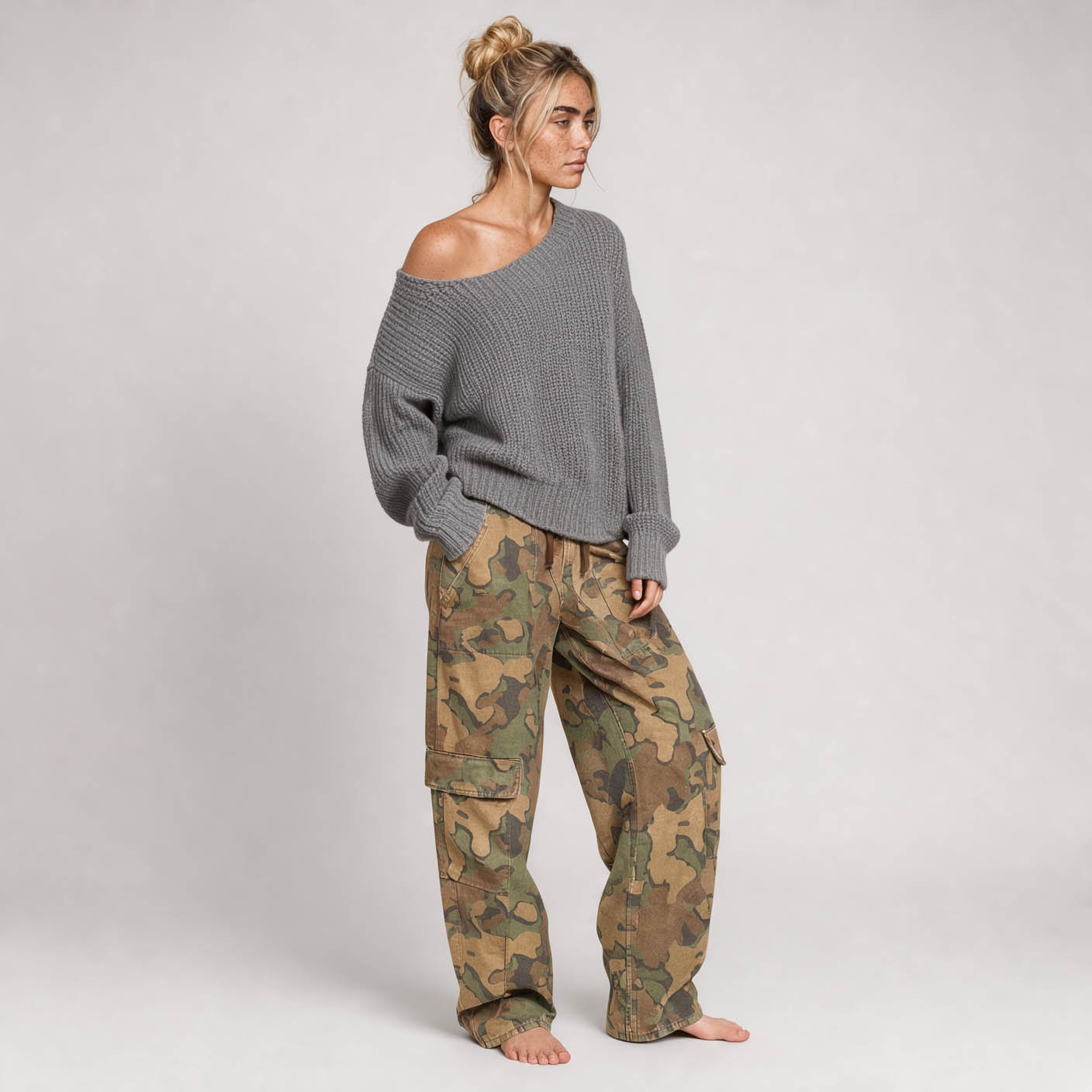
Portrait reference angled
Portrait reference frontal
Which model for what
Flux.2 Klein is faster and runs as 4B on 16 GB, under a license that is also free for commercial use. For courses, for small computers and for anything that needs many iterations, it is the first choice.
Flux.3 Klein needs 16 steps and considerably more time at 1024 × 1024, hardly any more at 1408 × 1408. It is under the FLUX Kommunity License, which is free of charge up to an annual revenue of 5 million US dollars. In return, it can do something Flux.2 Klein cannot: it reads bounding boxes and places elements by coordinates. More on this in 2.3.5. Whether a referenced person can be placed at a specific spot with a box is what I am testing next.
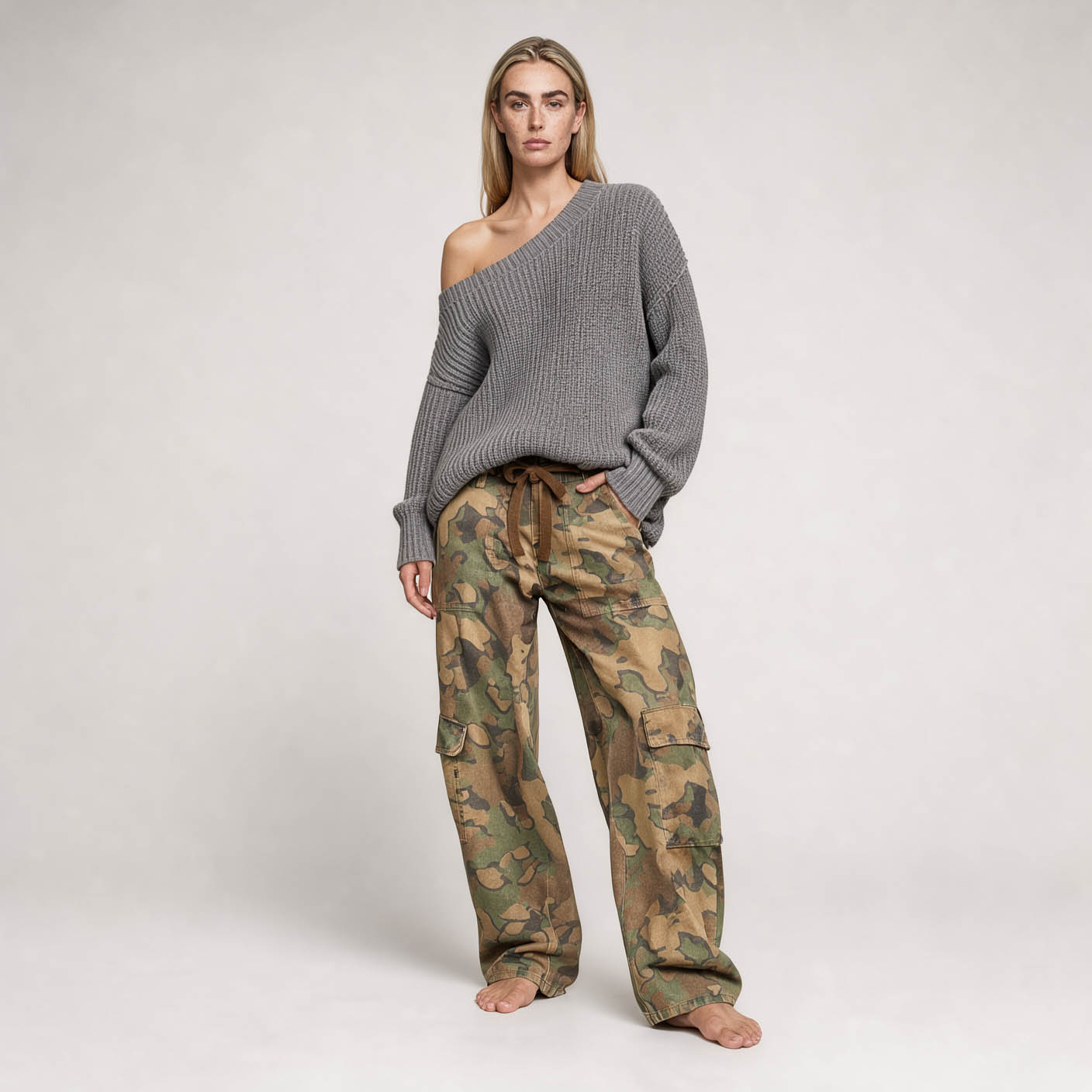
In my images so far, Flux.3 Klein is more literal, Flux.2 Klein has more expression. If the newer model is trained more strongly for prompt adherence and precise execution, the older one does not lose its relevance. It is not worth always chasing the newest model. Whoever knows a model knows where it holds and where it tips over, and that experience is worth more than the next version jump.
Flux.2 Klein 9B · 4 steps
Flux.3 Klein · 16 steps
All images on this page are unedited, exactly as they come out of ComfyUI. That is why you can also see that the two models render colors and skin tones differently. This would be easy to match in post-production. I deliberately left it.
Workflows
Both workflows are built flat, without subgraphs, and without the upsampler. The output size is decoupled from the reference. After loading in ComfyUI, enter your own model files and reference images. Flux.2 Klein also needs ComfyUI-GGUF.