AI · 2.5 Reference Images
What Reference Images Do
A portrait, a product shot, a prompt — and a model that understands what to take from where.
Four ways into the model
Anyone coming from cloud tools knows one way: upload images and say in the prompt what should happen to them. The woman from this one, the pants from that one, the light as in the third. Whether an image provides identity, composition or style is decided by the sentence that goes with it.
Locally, that cannot be taken for granted. An image can enter the model in four ways. In three of them, what it does is decided not by the prompt but by where in the workflow it is connected. The four are often confused, most often with img2img.
img2img — paint over
The image becomes the starting point. The model does not work from empty noise but from the noised image, and paints over it. Denoise controls how much of it remains. Composition, colors and shapes stick to the original. Good for variations and refinement, unsuitable for bringing a person or a product into a new image.
ControlNet — fix
A preprocessor extracts only the structure from the image: edges, depth or pose. Appearance stays out. What the image does is fixed by the preprocessor, not by the prompt. This is how RAY-L works.
Adapter — summarize
IP-Adapter and Redux condense the image through an image encoder into a summary in numbers and feed it into the model through weights trained after the fact. Strength can be adjusted, the effect limited with a mask. "Only the pants from this photo" cannot be said. And because the summary loses detail, a person comes out similar rather than the same.
In-context — read
The image passes through the same encoding as the image being generated and sits next to it at full resolution. The model is trained to read it. The new image is still created fresh, on an empty canvas. Only in this way does the prompt decide what is taken over, and only this way feels like what you know from the cloud. This is how Flux.2 Klein and Flux.3 Klein work.
Translated to the set: img2img is painting over an old print. ControlNet is the tape mark on the floor: you stand here, exactly here. The adapter is the mood board on the wall, everyone sees it, no one knows exactly what is meant. In-context is the reference you hand the model, with the sentence that goes with it: the hairstyle from this one, the pants from that one.
The workflow on this page and the next uses the fourth way. Anyone who says img2img out of habit and means a reference connects the image to the wrong input. It then gets painted over instead of read.
Two references, one prompt
The woman comes from my own image pool, which I am currently putting together as training material for a character LoRA. The person is entirely generated: the first image was created from a prompt, without any image reference. All others are variations of this base character. From this pool I generated a series of shots with different hairstyles and different make-up.
Because the person is entirely generated, no third party's personality rights are involved. More on this in 2.7.3 Personality Rights.
The pants are real: a product shot like every online shop has, lying flat, cut out, no body inside. Portrait and product shot sit in the workflow as references, Figure 1 and Figure 2. The two reference images and the prompt that goes with them produced the fashion shot below. The woman comes from the portrait, the pants from the shop, the leather jacket from the prompt alone.
Together these components make a credible model shot. The product shot hints at the cut of the pants but says little about how they sit when worn. That information has to go into the prompt. It should support what the image shows, because where it runs against it, conflicts can arise. Worn, they sit low on the hips, fall wide and rounded and rest on the feet — the way the brand's lookbook shows them worn.
That is what this chapter is about. Not repainting an image, but a model that understands what to take from an image.
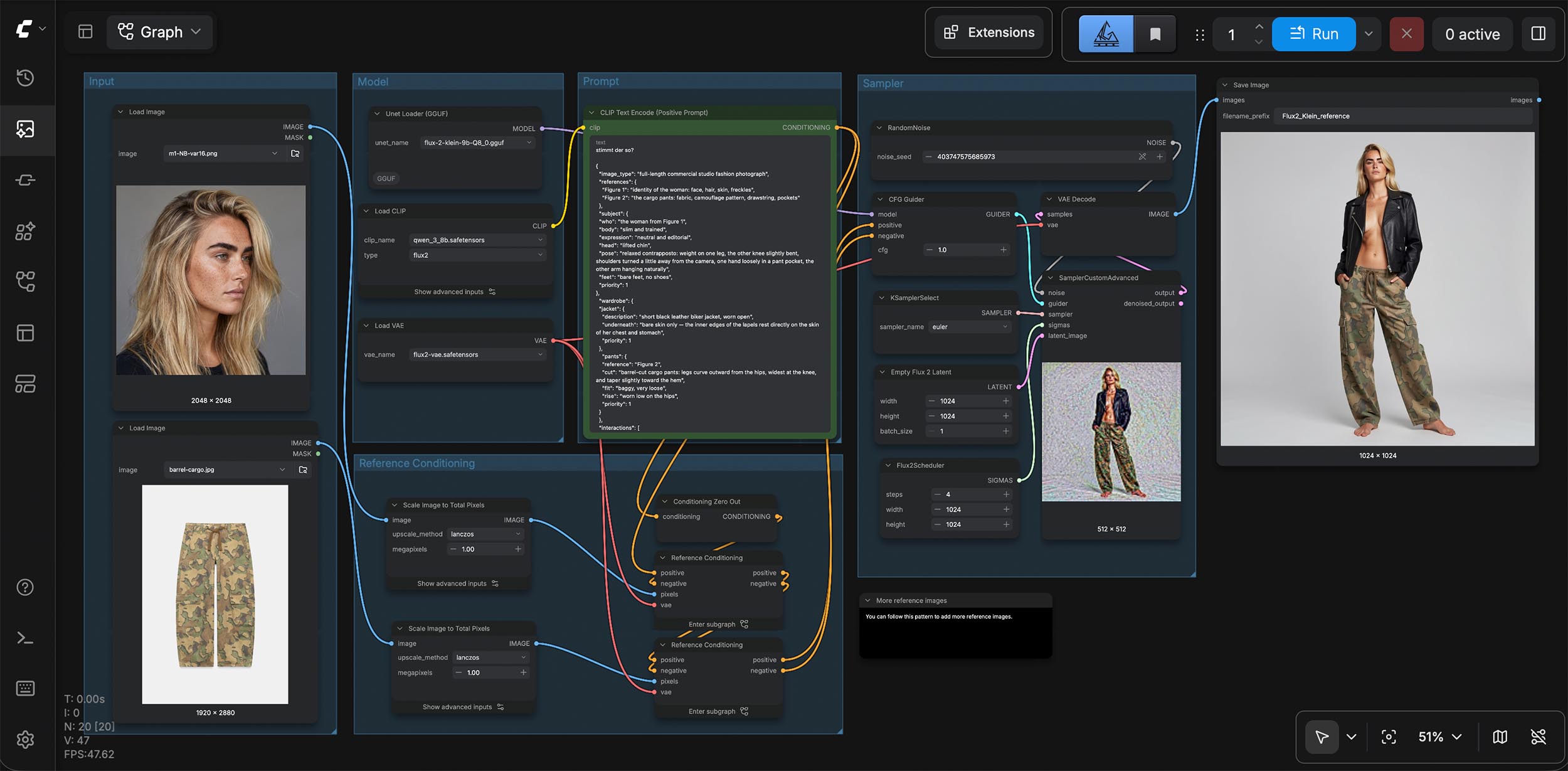
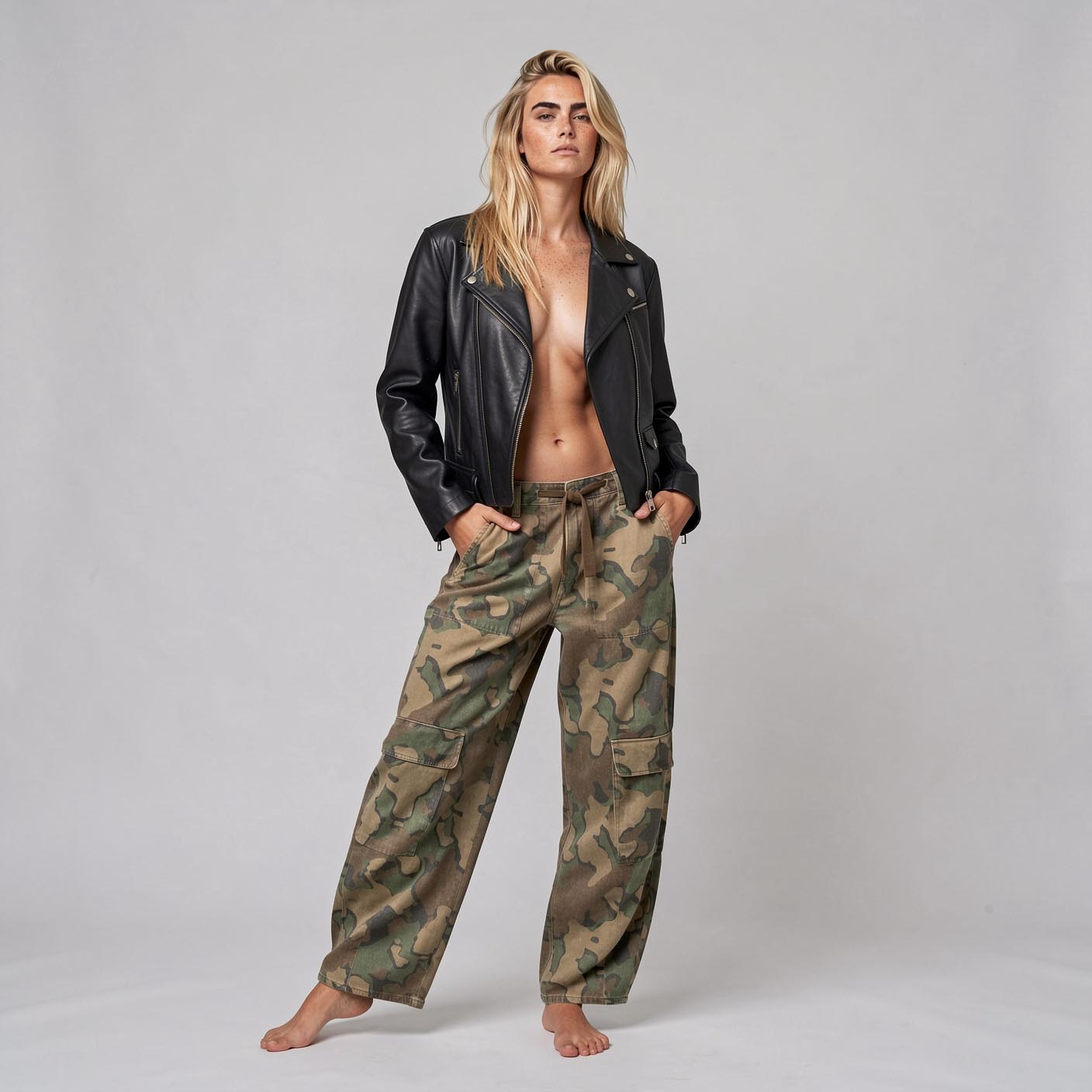
Flux.2 Klein 9B · 1408 × 1408 · 8 steps
What a reference brings
From the portrait came face, freckles, brows and hair color. And the hairstyle, which was not in the prompt at all. From the product shot came fabric, camouflage pattern in exactly this color scheme, the brown drawstring, the cargo pockets. Neither "camouflage" nor "drawstring" appears in the prompt. Pattern and drawstring are there anyway. There is no clearer way to show that the model reads the reference. That you cannot always rely on it is shown in 2.5.2.
A reference delivers what can be seen in it. Nothing more. This applies to every product. A manufacturer's photo always shows one particular state — lying flat, on the hanger, cut out, unused. How the product should appear in the image, worn, broken in, opened up, is described by the prompt.
The two product shots as they go into the workflow as Figure 2. Lying flat, no body inside, no hint of how the pants sit when worn.
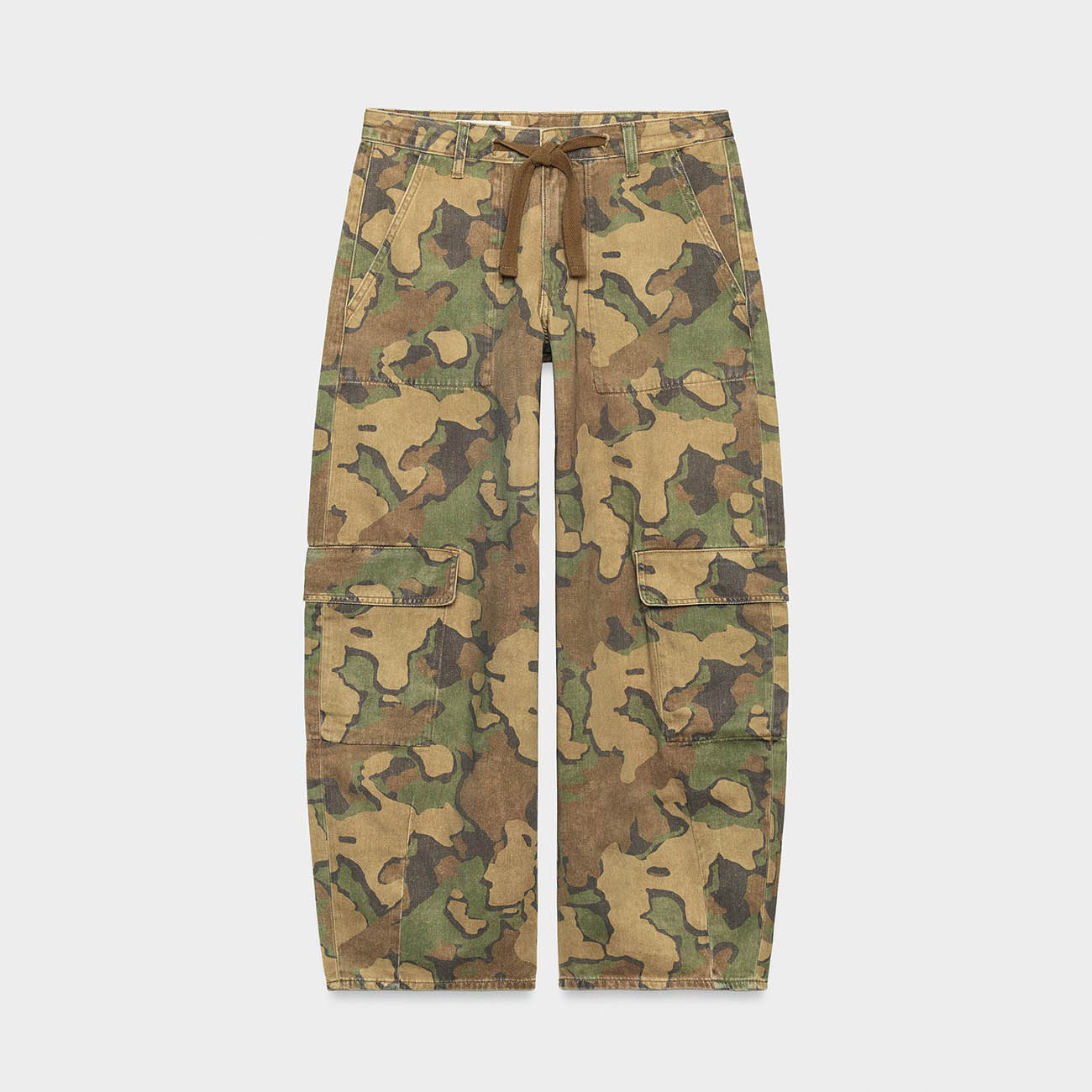
Figure 2 · cargo pants
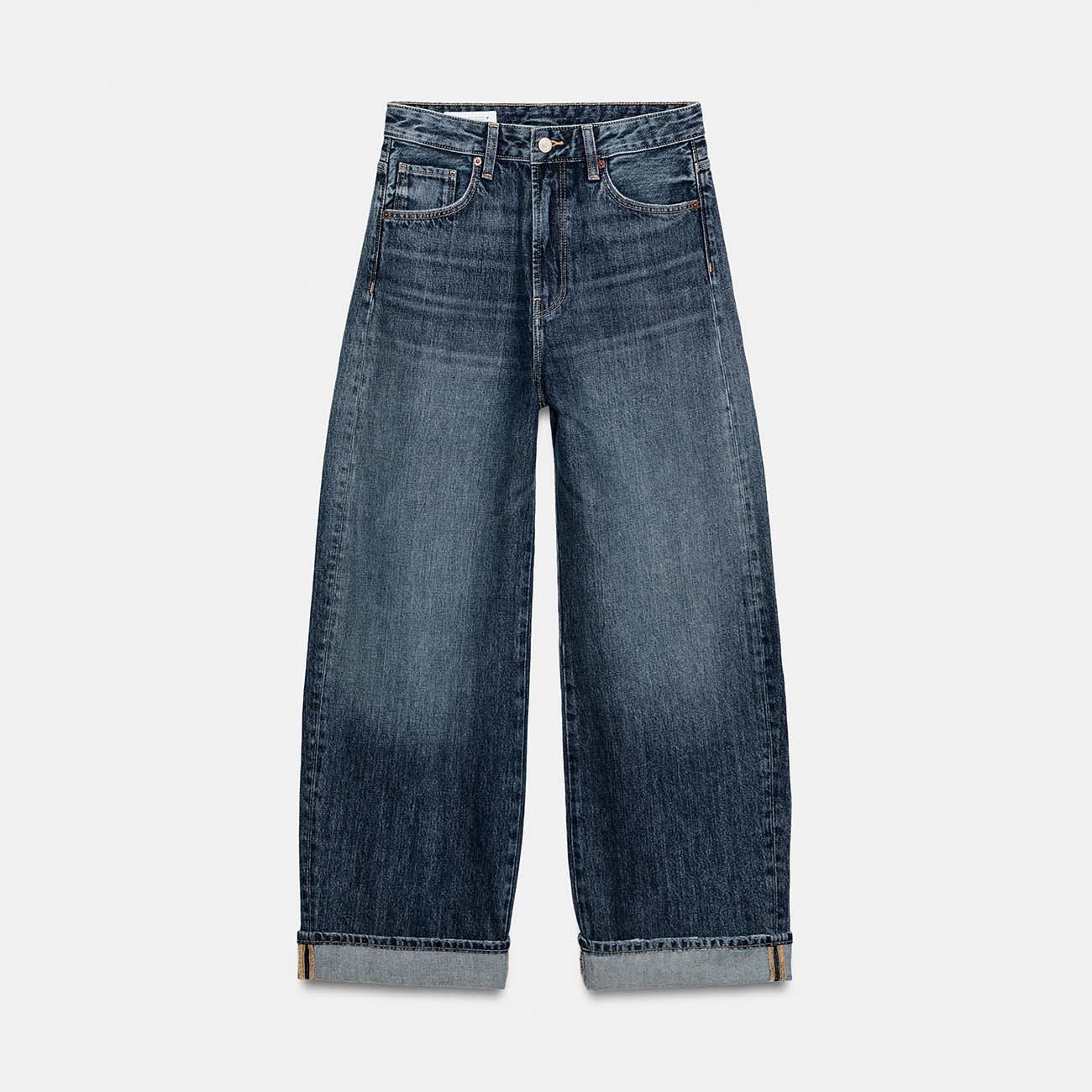
Figure 2 · jeans
Product shots: Zara · www.zara.com
How directly a reference acts is shown by a simple swap. Same prompt, same seed, same steps. Only one reference is swapped at a time: the portrait, the same woman with her hair down or up, and the product shot, cargo pants or jeans. Pose, light and jacket stay put in all four images. What changes is what the new reference specifies.
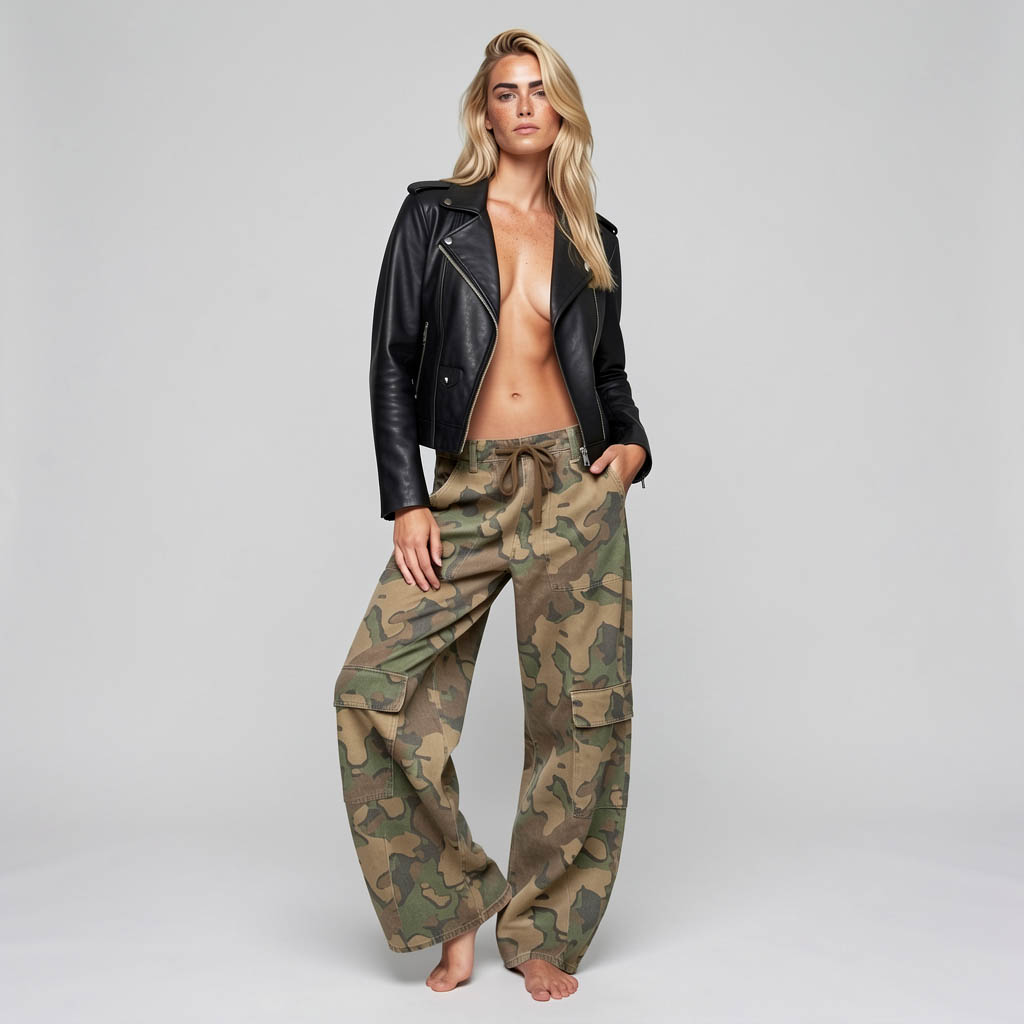
Hair down · cargo pants
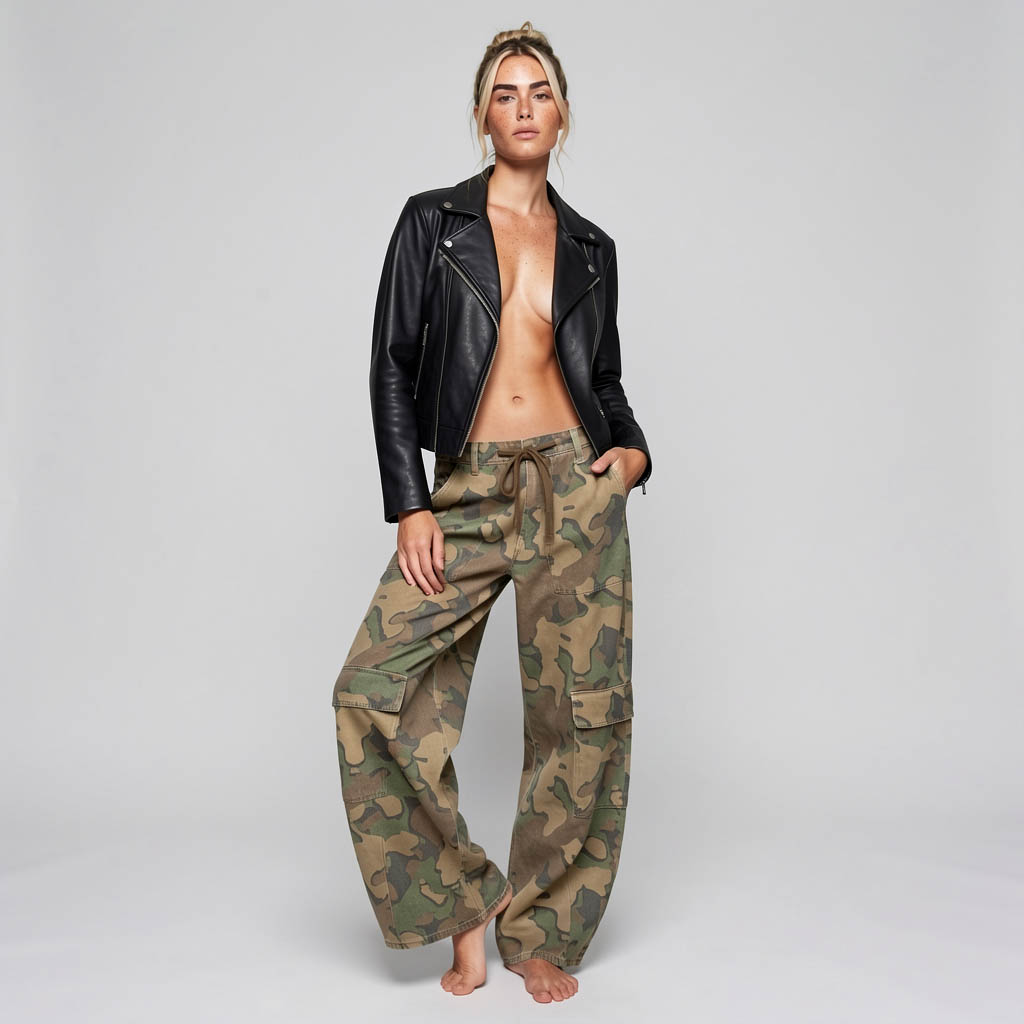
Hair up · cargo pants
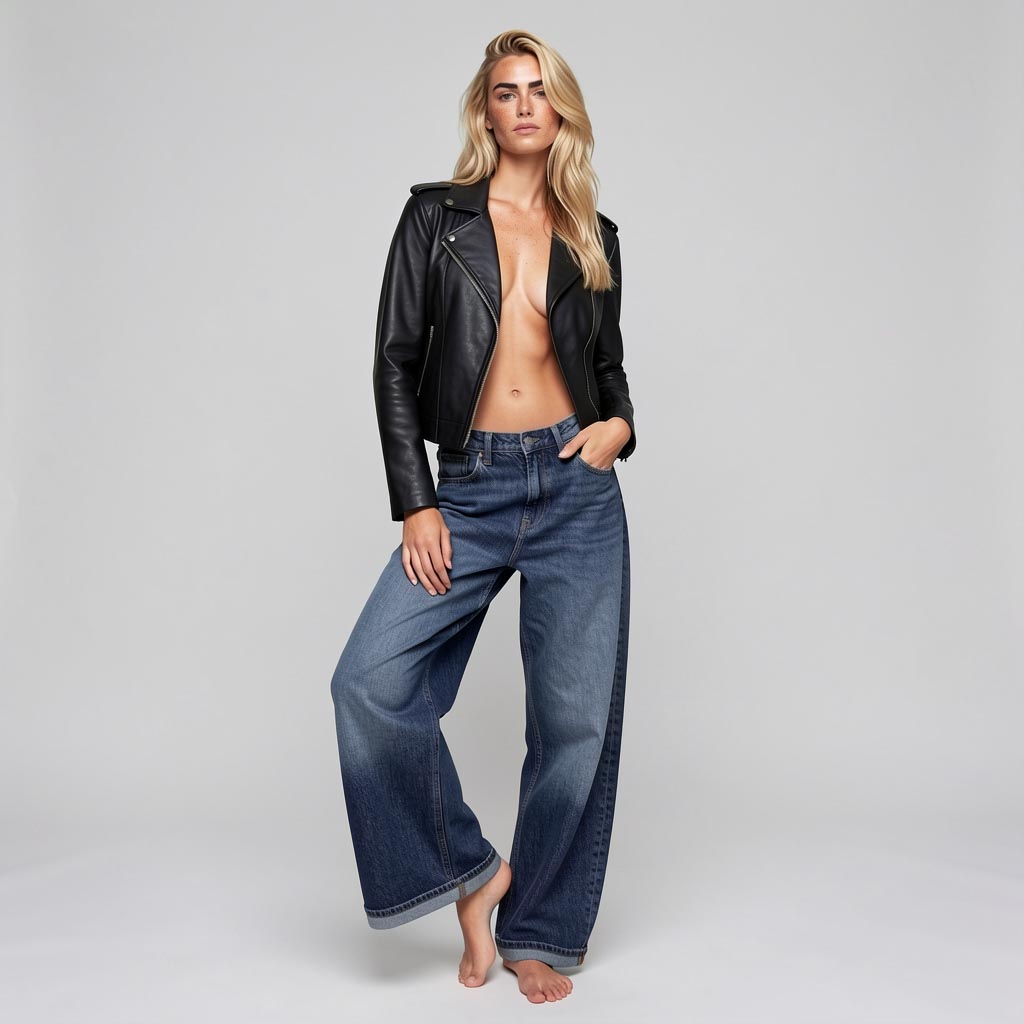
Hair down · jeans
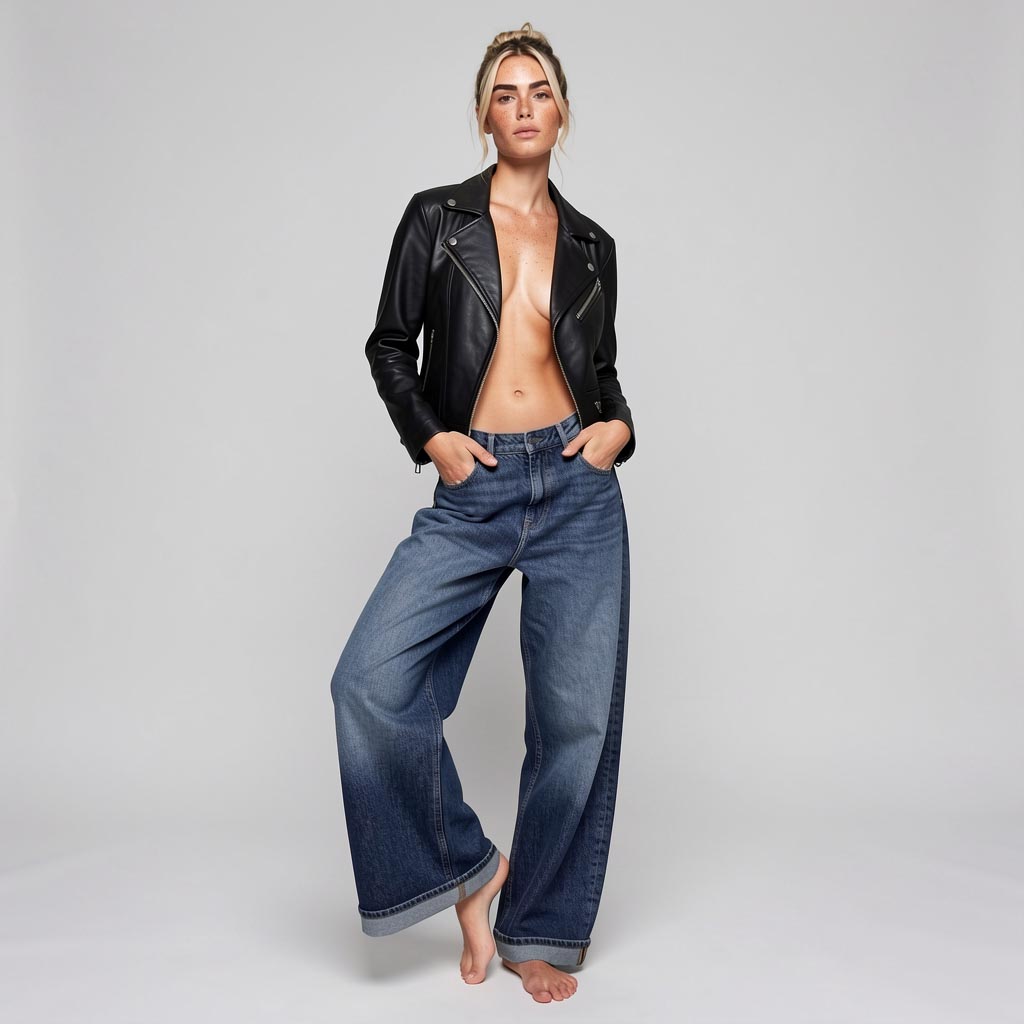
Hair up · jeans
Almost. Three of four images hold the pose down to the hand. In the fourth, both hands are in the pockets, although the prompt leaves one free. Neither the hairstyle nor the jeans alone triggers this, only both together. Every reference acts on the whole image, not just on what it is meant for. What the prompt only narrowly decides can tip over in a combination that holds individually.
Fixing or guiding
The obvious division would be: the reference determines what something looks like, ControlNet determines where it stands. It is not that clean. A reference can also carry a pose — a third image, and a note in the prompt that only the stance should be taken from it. Whether that works without crosstalk, without clothing or face of the pose reference wandering in, is what I am testing right now.
The real difference lies in how binding it is. ControlNet fixes. Edges or depth are taken over pixel-accurately, the perspective matches the template. A reference guides. The model interprets it, the way a model re-enacts a pose reference: in spirit, not to the pixel.
For a fashion shot, that is enough. For a sofa that has to go into a Blender scene with a fixed perspective, it is not. Reference images therefore do not replace ControlNet, they complement it. That is why RAY-L works with ControlNet. And anyone who needs both, a fixed geometry and a specific product in it, combines both — that is the subject of 2.5.4.
The prompt directs
In Flux.2 Klein, reference images get names: Figure 1, Figure 2, in the order in which they are connected in the workflow. The prompt assigns the roles. For the identity of the woman use Figure 1. As reference for the pants use Figure 2. That sounds trivial and is the actual shift. The reference image is no longer a mood that somehow seeps into the picture, but material that language can refer to.
This has a flip side, which I learned when switching to a JSON prompt. Whoever specifies what must be visible — the skin between the open sides of the jacket, both pant legs down to the floor — also specifies how the person has to stand. Suddenly she stood with her legs apart and arms hanging, with every seed. Only a concretely described pose solved it: standing leg, free leg, one hand in a pocket.
How such prompts are built is covered in the Prompt School. The full prompt for the camouflage cargo variant:
Show prompt · JSON +
{
  "image_type": "full-length commercial studio fashion photograph",
  "references": {
    "Figure 1": "identity of the woman: face, hair, skin, freckles",
    "Figure 2": "the cargo pants: fabric"
  },
  "subject": {
    "who": "the woman from Figure 1",
    "body": "slim and trained",
    "expression": "neutral and editorial",
    "head": "lifted chin",
    "pose": "relaxed contrapposto: weight on one leg, the other knee slightly bent, shoulders turned a little away from the camera, one hand loosely in a pant pocket, the other arm hanging naturally",
    "feet": "bare feet, no shoes",
    "priority": 1
  },
  "wardrobe": {
    "jacket": {
      "description": "short black leather biker jacket, worn open",
      "underneath": "bare skin only — the inner edges of the lapels rest directly on the skin of her chest and stomach",
      "priority": 1
    },
    "pants": {
      "reference": "Figure 2",
      "cut": "barrel-cut cargo pants: legs curve outward from the hips, widest at the knee, and taper slightly toward the hem",
      "fit": "baggy, very loose",
      "rise": "worn low on the hips",
      "priority": 1
    }
  },
  "interactions": [
    "the open jacket ends at the waist and falls loosely open over bare skin",
    "the wide pant legs fall to the floor and rest on the bare feet"
  ],
  "setting": {
    "backdrop": "seamless pale grey studio backdrop",
    "priority": 3
  },
  "lighting": {
    "key": "large soft diffused key light",
    "priority": 2
  },
  "style": {
    "palette": "neutral",
    "quality": "clean high-end fashion catalogue",
    "priority": 2
  }
}
Which model can do what
Flux.2 Klein 9B reads reference images without an additional model, with the same setup and the same parameters as without a reference. Flux.2 Klein 4B does the same. On a MacBook Air with 16 GB, both references are worked in just as with 9B. Colors are paler, and fine detail and prompt adherence fall clearly behind the larger model. That is down to model size, not the computer. As a Q8 GGUF, one image at 1024 × 1024 and 4 steps takes just under six minutes. The entire workflow thus runs on 16 GB and under Apache 2.0. The undistilled base variants of Flux.2 Klein, by contrast, ignore references completely: with the same seed, the image came out pixel-identical with and without a reference. Flux.3 Klein reads reference images without an adapter as well, on the same principle, just with its own setup.
Flux.1 dev, Flux.1 Krea dev and SDXL cannot read reference images on their own. For them, the adapter remains. In return, these models have what Flux.2 Klein still lacks in ComfyUI: ControlNet.
This sets the order of the following pages. 2.5.2 shows setup and workflow for Flux.2 Klein and Flux.3 Klein. 2.5.3 covers adapters for models without built-in reference reading, 2.5.4 the combination with ControlNet.