AI · Model-specific setups
Flux.3 — Klein
A model that runs on 16 GB, composes images from coordinates — and understands a JSON prompt as it is.
Two days after release
On October 15, 2026, Black Forest Labs released Flux.3 Image Klein, the first open-weights model of the Flux 3 family. Two days later it was running on both of my test machines. Not right away: the first image was black, the second a texture with no subject. Neither error came with an error message, and that is exactly why they get their own box further down.
After that, it ran. On the MacBook Pro in full precision, on the 16 GB MacBook Air quantized — and there with an image quality close to Flux.2 Klein 9B, which doesn't even start on that machine.
But speed isn't what's really new. Flux.3 Klein accepts coordinates: you define where in the image something should be, and that's where it ends up. Combined with a structured JSON prompt, this gives a degree of control that earlier models didn't offer.
I'm testing the model extensively. What you read here is the state after the first test runs — not a verdict, but an interim report that will grow.
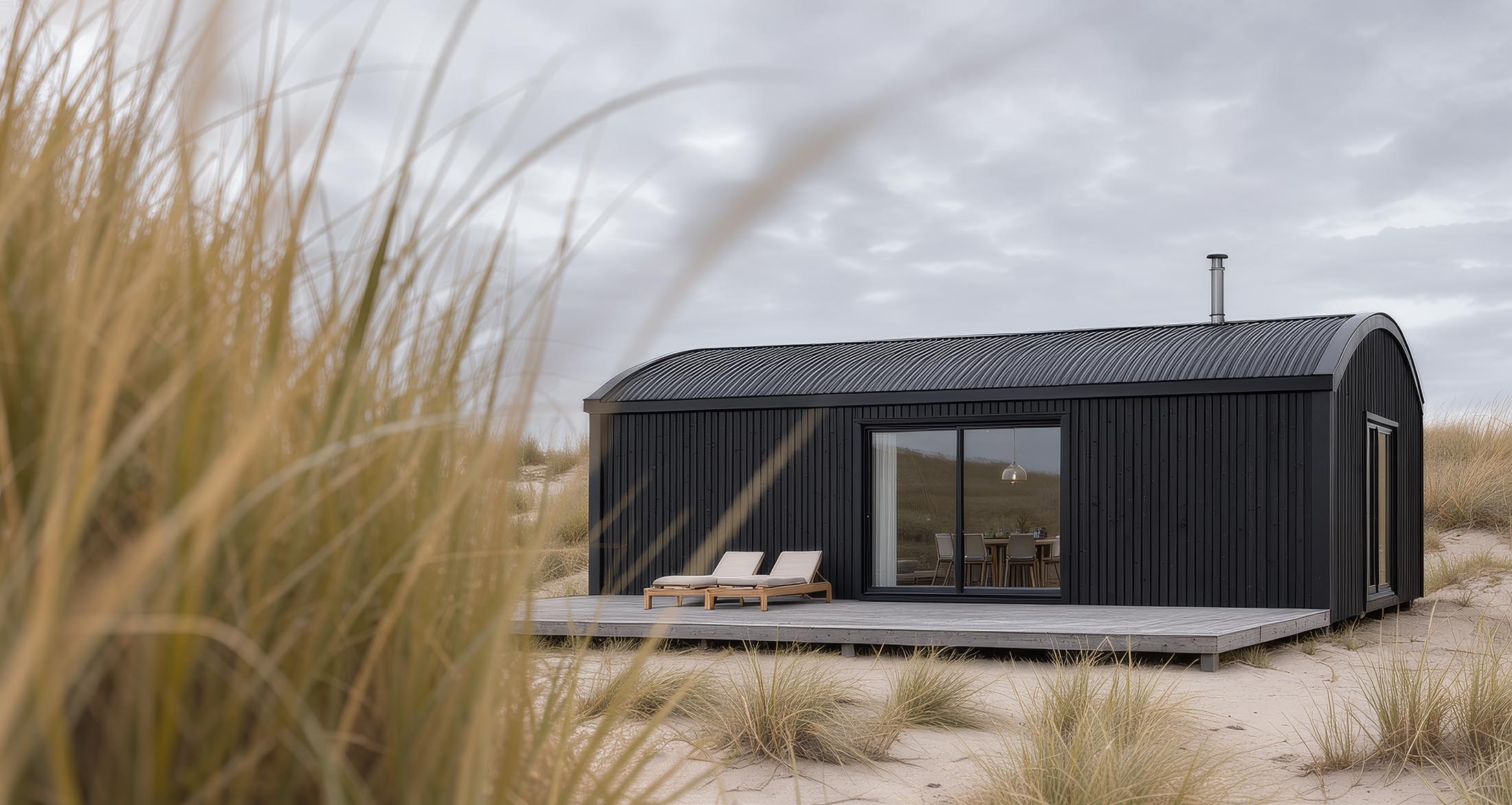
What Flux.3 Klein is
Unlike Flux.2 Klein, Flux.3 Klein comes in a single size: 5.6 billion parameters. The choice lies elsewhere, between two forms of the same model. The distilled variant produces a finished image in 4 to 16 steps, without CFG. The base variant needs 50 steps at CFG 3.5 and is meant for fine-tuning and LoRA training. For image work, the distilled one is the right choice.
The text encoder is Qwen3-VL-4B — a language model that also understands images. That's more than a technical detail: a language model reads a prompt the way a person reads it, and that matters when prompting. The VAE is the same as in Flux.2. If you've set up Flux.2 Klein, it's already in your folder.
Besides text-to-image, the model can edit existing images, combine up to ten reference images and place image elements via bounding boxes. In its own comparisons, Black Forest Labs ranks Flux.3 Klein above Flux.2 Klein 9B. Those are the manufacturer's figures — my own comparisons follow below.
What it delivers
The measurements — all at 1024×1024, warm (models in memory), 16 steps:
| Model | MacBook Pro 64 GB | MacBook Air 16 GB |
| Flux.2 Klein 4B | 36 s | 90 s |
| Flux.2 Klein 9B | 75–85 s | — (not practical) |
| Flux.3 Klein | 171 s (BF16) | 378 s (Q4_K_M + int8) |
| Flux.1 dev | 360 s | — (OOM) |
Flux.3 Klein is slower: on the Pro it takes about five times as long as Flux.2 Klein 4B and twice as long as Flux.2 Klein 9B. The more interesting line is the right-hand column. On the Air, Flux.3 Klein finishes in just over six minutes — faster than Flux.1 dev on the Pro, which doesn't even start on the Air.
In terms of quality, Flux.3 Klein comes close to Flux.2 Klein 9B even in its quantized form. Same prompt, same seed: the basic character of the images is very similar. Flux.2 Klein 4B also follows the same prompt, but shows deformed elements and less detail. For 16 GB hardware this means: until now, Flux.2 Klein 4B was the only option; now there's a second one, a step up.
16 steps is Black Forest Labs' default. In my tests, 12 steps showed no visible loss — 272 instead of 378 seconds on the Air. A step series with 4, 6, 8, 12 and 16 steps is in progress.
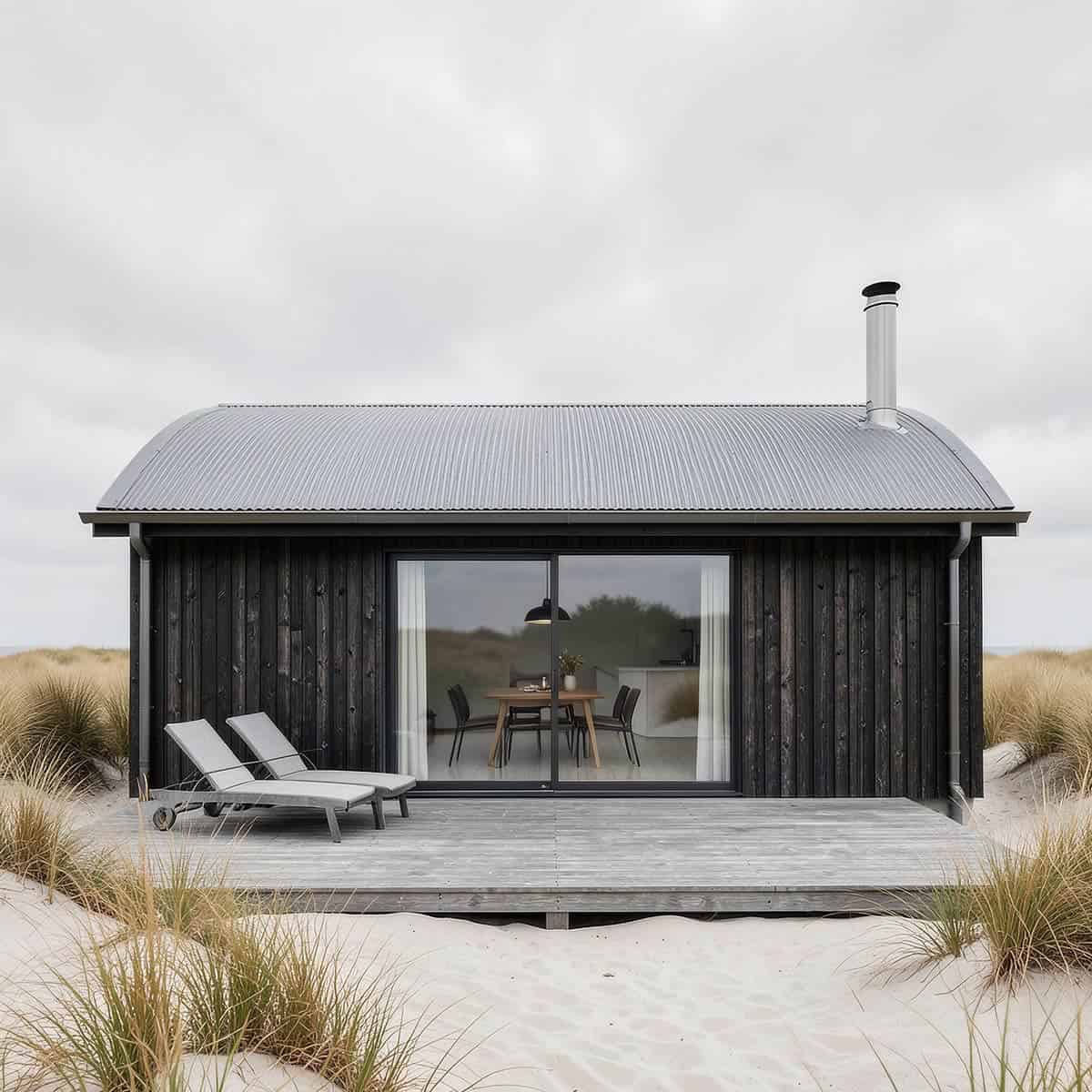
Flux.2 Klein 4B
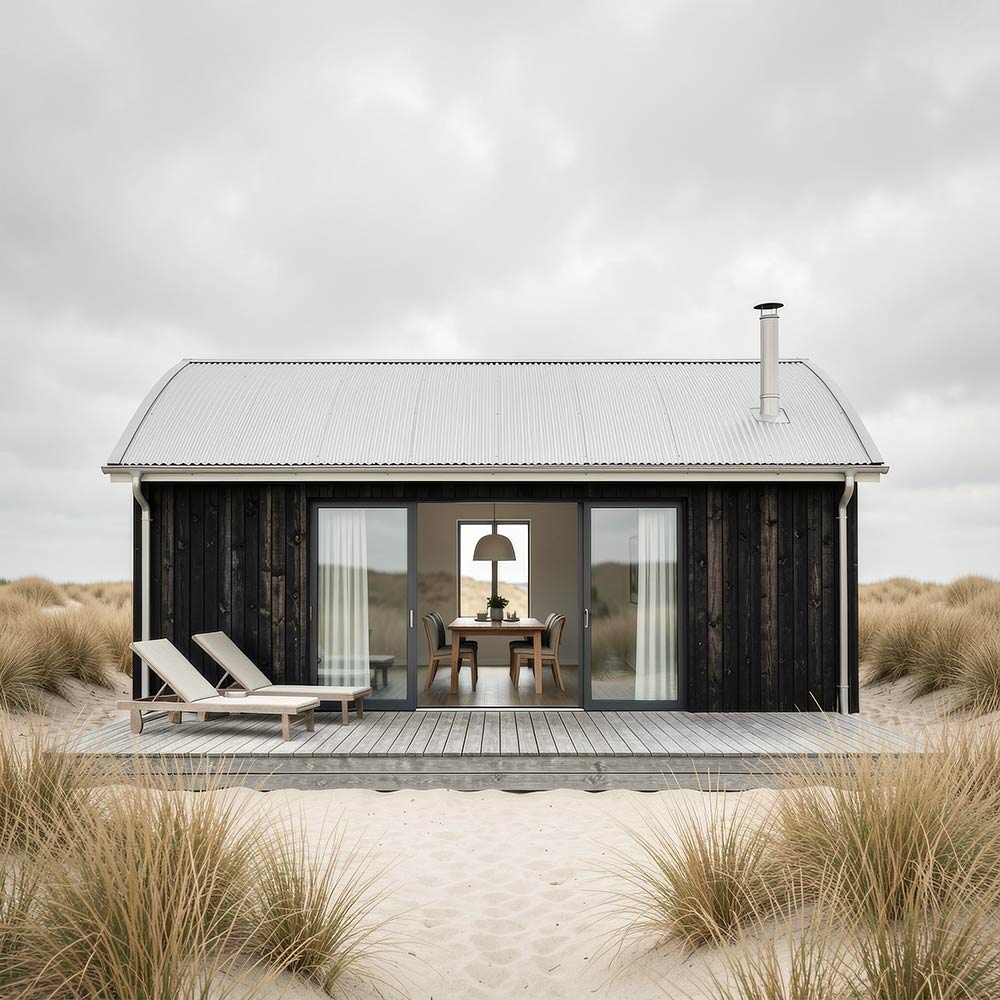
Flux.2 Klein 9B
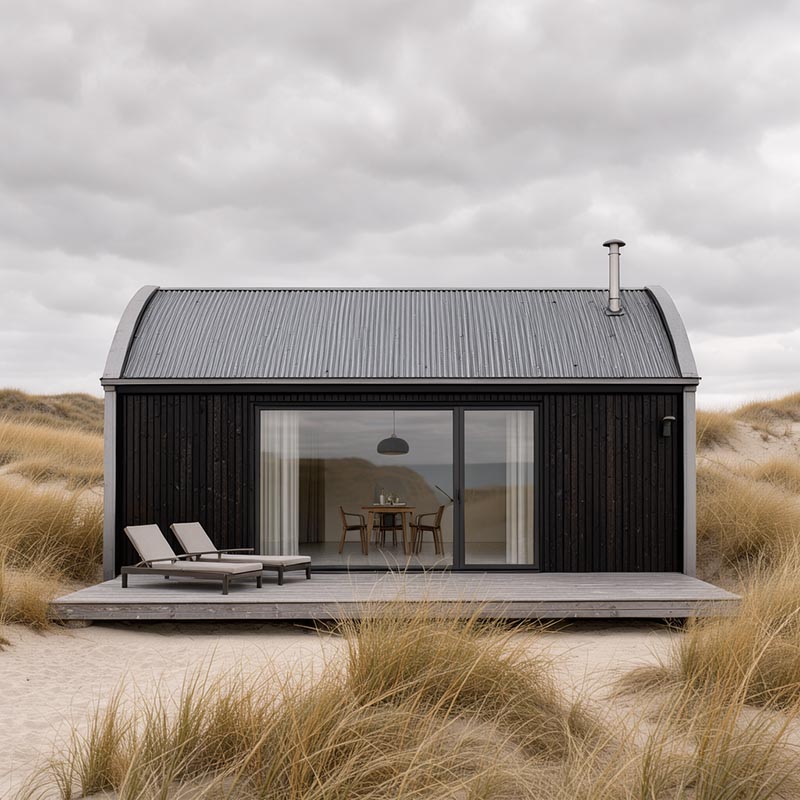
Flux.3 Klein · Q4_K_M · Air
Setup
Files and target folders
64 GB (MacBook Pro) — 171 s warm:
| File | Size | Target folder |
| flux3-image-klein-bf16.safetensors | 11.1 GB | diffusion_models/ |
| qwen3vl_4b_bf16.safetensors | 8.9 GB | text_encoders/ |
| flux2-vae.safetensors | 336 MB | vae/ |
Full precision, no quantization. On 64 GB, memory isn't a bottleneck, and BF16 is the reference every quantized version has to be measured against.
16 GB (MacBook Air) — 378 s warm:
| File | Size | Target folder |
| flux-3-image-klein-Q4_K_M.gguf | 3.67 GB | diffusion_models/ |
| qwen3vl_4b_int8_convrot.safetensors | 4.9 GB | text_encoders/ |
| flux2-vae.safetensors | 336 MB | vae/ |
Total footprint just under 9 GB. The memory gauge stays green throughout. The BF16 encoder alone would take up more than half the memory at 8.9 GB — the int8 version halves that and runs on Apple Silicon; more on this in the MPS rule below. The diffusion model in GGUF format needs the ComfyUI-GGUF custom node and the Python package gguf, set up as described on the Flux.2 Klein page.
Downloads
| File | Repository |
| flux3-image-klein-bf16.safetensors | black-forest-labs/flux-3-image-klein-comfy → diffusion_models/ |
| qwen3vl_4b_bf16.safetensors qwen3vl_4b_int8_convrot.safetensors |
black-forest-labs/flux-3-image-klein-comfy → text_encoders/ |
| flux-3-image-klein-Q4_K_M.gguf | unsloth/flux-3-image-klein-GGUF → not the repo with “-base” |
| flux2-vae.safetensors | black-forest-labs/flux-3-image-klein-comfy → vae/ (identical to the Flux.2 VAE) |
The repositories are gated: accept the license terms on the model page at Hugging Face first, then download. And watch the file names. Black Forest Labs renamed them a day after release: the distilled variant is now called flux3-image-klein-… with hyphens, the base variant has -base- in its name. Parts of the ComfyUI documentation still use the old names with underscores and the abbreviation _sd_ for the distilled variant.
I don't need the prompt upsampler from the same repository. It's a separate language model with 9 billion parameters that expands short prompts before generation. If you write your own prompts, that's exactly what you don't want — and on 16 GB there's no room for it anyway.
Nodes in ComfyUI
Flux.3 Klein requires ComfyUI 0.41 or later. The bundled templates (“Flux.3 Image Klein Distilled: Text to Image”) are a good starting point. They have the upsampler enabled by default — switch it off via enable_prompt_upsampler.
| Task | Node |
| Diffusion model BF16 | Load Diffusion Model |
| Diffusion model GGUF | Unet Loader (GGUF) |
| Encoder BF16 and int8 | CLIPLoader, type = flux3 — not CLIPLoader (GGUF) |
| Enter text | CLIP Text Encode |
MPS rule
As with Flux.2 Klein: anything with fp8 or nvfp4 in the file name won't run on Apple Silicon. What's new is int8_convrot: a format optimized for NVIDIA cards that also computes on the Mac via a generic PyTorch path. Tested with the encoder on the Air — it runs, with half the memory footprint of BF16.
Three silent errors
An error with a message is quickly found. These three run through without a message and deliver an image — just the wrong one.
Black image
Cause: ComfyUI runs with the launch option --force-fp16, once a common recommendation for the Mac. Flux.3 Klein was trained in BF16. In fp16, intermediate values overflow, the image ends up with invalid values, and the VAE turns them into black. Fix: remove the option in Stability Matrix under Launch Options.
Image with no subject
Cause: the int8 encoder is connected to CLIPLoader (GGUF) instead of the regular CLIPLoader. It loads without a warning, but the weights aren't converted back correctly. The model gets no usable prompt and paints a texture. Fix: always load safetensors encoders in the regular CLIPLoader, and use the GGUF loader only for the diffusion model.
Boxes in the wrong place
Cause: coordinates in the wrong order or in pixels. Flux.3 Klein expects [y_top, x_left, y_bottom, x_right] on a scale from 0 to 1000 — y first. If you write x first out of habit, you get a mirrored layout. More on this in the prompting section.
Parameters
For the distilled variant. Here too, CFG 1.0 means: no working negative prompt.
Steps:      16  (12 without visible loss)
CFG:        1.0  (CFG Guider)
Sampler:    euler
Scheduler:  Flux2Scheduler
Prompting: JSON and bounding boxes
There's no negative prompt. Anything unwanted is rephrased positively, as with Flux.2 Klein: “an empty beach” instead of “no people”. What's new lies elsewhere.
The prompt as JSON
A prompt isn't parsed. It goes through a language model as a whole, and that model reads structure the way a person does. That's why Flux.3 Klein — like Flux.2 Klein before it — understands a freely structured JSON prompt directly: camera, light, elements, interactions, each in its own field. The language model forgives syntax errors and interprets custom field names correctly.
The advantage shows when checking the result. Every field becomes an item you can tick off against the image. And whatever gets its own field ends up in the image: the two interactions in the test prompt — the dune grass overlapping the edge of the deck, the sky reflected in the glass door — each had their own field, and both were rendered.
What JSON alone can't do is composition. “Sky across two thirds of the image, house low in the frame” wasn't rendered by any model, neither Flux.2 Klein nor Flux.3 Klein, not even with the highest priority in the field. A ranking raises importance; it doesn't set coordinates.
Bounding boxes
This is where Flux.3 Klein comes in. Each image element gets its own box with coordinates and its own description. The coordinates are relative, from 0 to 1000, and so apply to any image size — only the aspect ratio has to be fixed before you lay out the boxes, because the grid stretches with the format.
Black Forest Labs documents a fixed format for this: running text with markers, followed by a list of boxes. But it also works directly in JSON. The boxes simply sit as a bbox field on the elements:
{
  "id": "roof_1",
  "rank": 1,
  "bbox": [500, 180, 580, 820],
  "caption": "a barrel-vaulted corrugated metal roof",
  "desc": "A shallow barrel-vaulted roof of dark corrugated
           metal, one continuous gentle arch from the left
           eave to the right eave."
}
The structure is free; the coordinates are convention. The language model forgives a missing comma, but not swapped axes: [y_top, x_left, y_bottom, x_right], y first.
The complete prompt of the opening image — ten elements with boxes, camera, light and seed — is available to copy at the end of this page.
An image series
The same prompt as on the Flux.2 Klein page, the same seed, four stages. As prose and as JSON, the house sits too high, and the curved roof becomes a gable roof. With boxes, sky, house and roof are right — only the loungers turn into armchairs. The box was almost square, and an upright armchair fits a square box, a flat lounger doesn't. The shape of the box carries geometry. A flat, wide box, nothing else changed: the loungers are right, and the rest of the image has stayed practically the same.
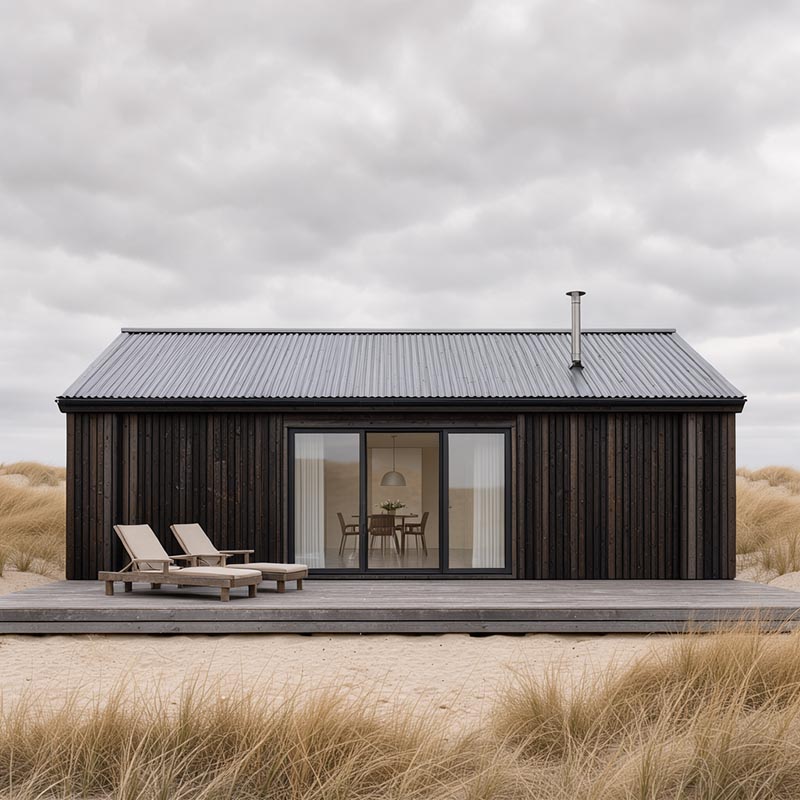
1 · Prose
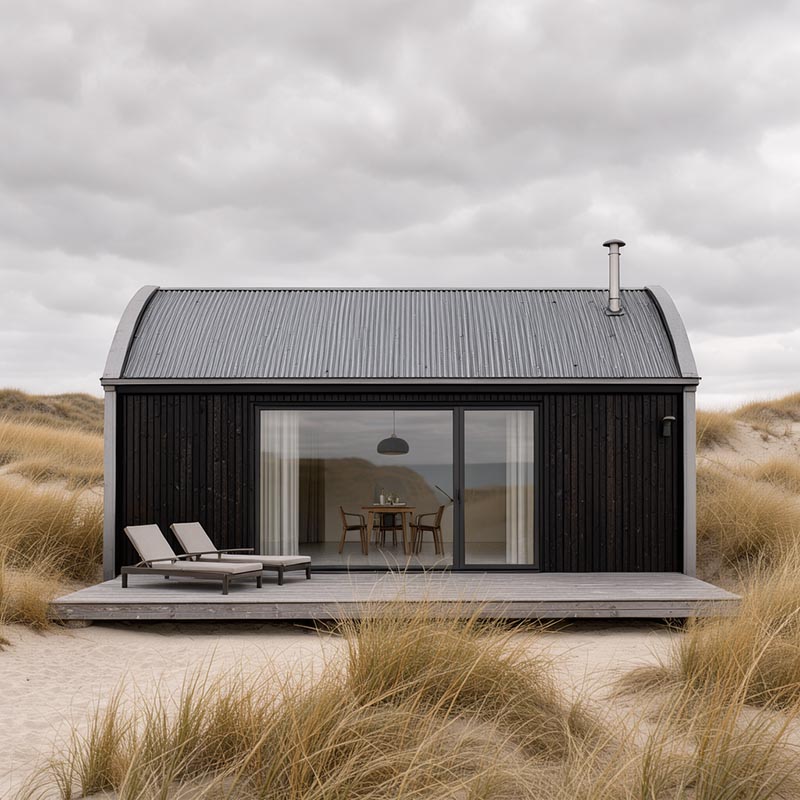
2 · JSON
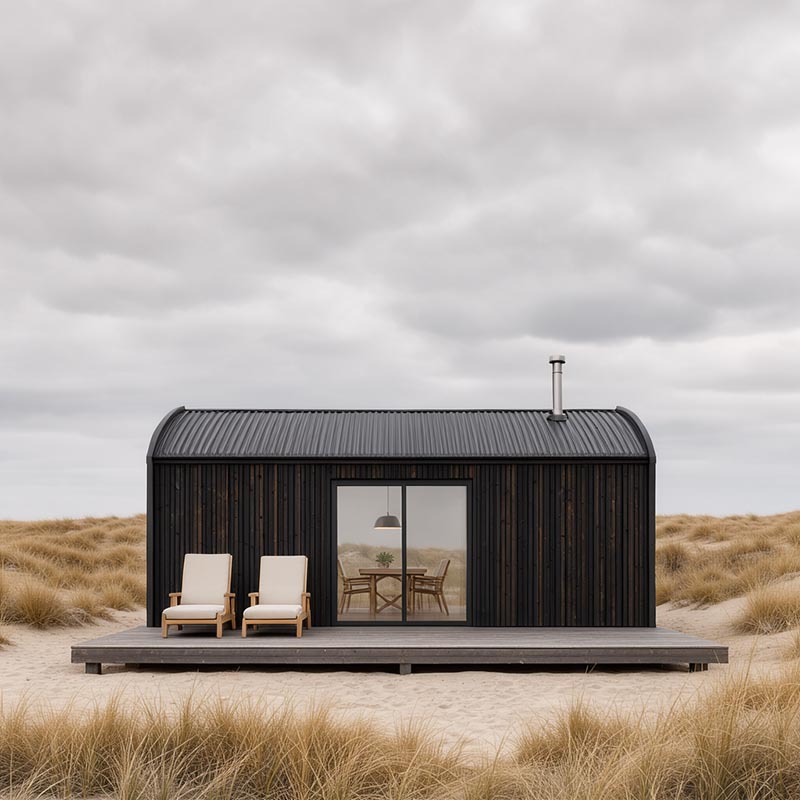
3 · JSON with boxes
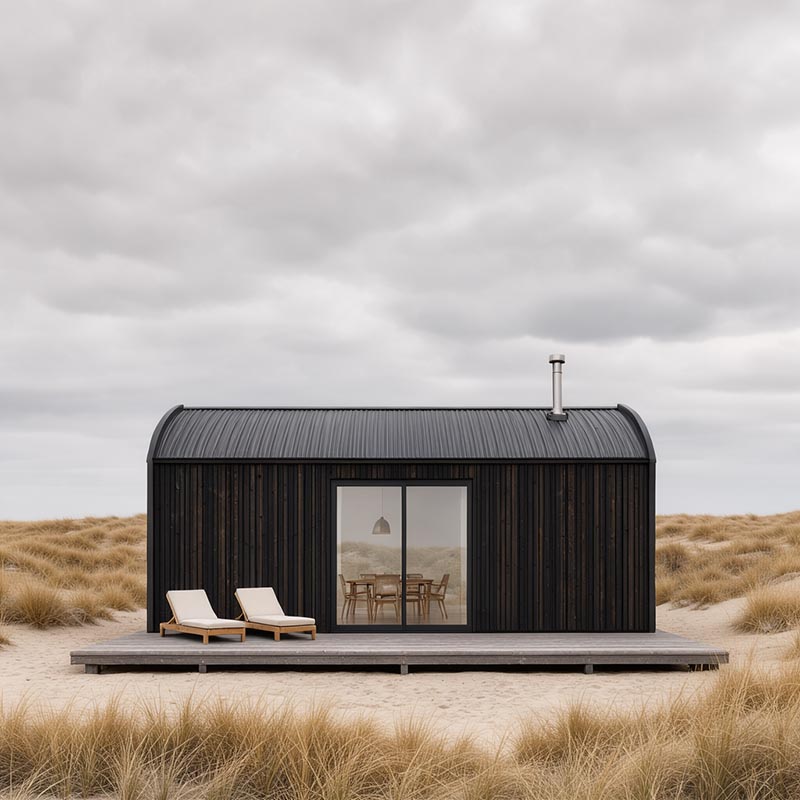
4 · Lounger box corrected
This suggests a workflow: lay out the composition with boxes, fix the seed, check the image, change only the faulty element. A targeted correction without a mask and without inpainting. So far, all of this rests on one subject and one seed. Cross-checks with more seeds and subjects are under way, and this page will be updated with the results.
How to build prompts from such a structure is covered in detail in the Prompt School (in preparation).
Coordinates without measuring
Coordinates can be calculated by hand: pixels from the top divided by image height times 1000, pixels from the left divided by image width times 1000. It's easier in ComfyUI itself. In the Create Bounding Boxes node you draw the boxes on a canvas in the format of the output image, and FLUX.3 Layout Prompt appends them to the prompt in the right format. The boxes are then called obj_1, obj_2 and so on, and the axis-order error can no longer happen.
Editing and reference images
Flux.3 Klein can edit existing images by instruction and combine up to ten reference images, addressed in the prompt as <ref_image_0>, <ref_image_1> and so on. Black Forest Labs promises that the rest of the image is preserved during an edit. Their own examples show what that means: depending on the edit, between 68 and 94 percent of the pixels remain identical — not all of them.
For product images, series with recurring characters and objects that have to stay exact, this is the most exciting part of the model. My own tests will follow.
Local or via the API
Black Forest Labs' documentation describes the API model. Some of it isn't available locally: via the API, the model can search the web on request to depict real things correctly; it offers fixed aspect ratios and resolution tiers up to 4K; it expands short prompts automatically; and after an edit it additionally restores untouched areas. Locally you set width and height directly, the upsampler is a separate model, and web search is missing entirely. Worth knowing if you rebuild examples from the BFL documentation locally.
License
Flux.3 Klein comes under a new license, the FLUX Kommunity License. It sits between Apache 2.0 and the previous non-commercial license. If you, together with affiliated companies, have less than 5 million US dollars in annual revenue, you may use the generated images commercially and run the model in production for that purpose, without a license fee. Above that, you need a license from Black Forest Labs. For freelancers and small studios, that's good news. For the marketing department of a large company, it means: license before going into production.
The license also requires generated images to be filtered or reviewed before distribution, and to be labeled as AI-generated where the law requires it. Circumventing the model's safety mechanisms is expressly prohibited. The text encoder is separately licensed under Apache 2.0.
Compared with Flux.2 Klein, one advantage is lost: Flux.2 Klein 4B is under Apache 2.0 and free to use without a revenue cap. More on this in 2.1.4 — Understanding license models. What governs is the current version on bfl.ai; guidance, not legal advice.
And RAY-L?
There's no ControlNet Canny for Flux.3 Klein yet. That means the core of RAY-L is missing: geometry from Blender, material and light from the model. The roof test shows why that matters. A roof shape is geometry, and geometry can only be given to a diffusion model indirectly — through wording, boxes and seeds.
Still, bounding boxes open a door. They aren't geometry, but they are a composition made of coordinates. And Blender can deliver coordinates: for every object you can calculate where it sits in the camera view. The Create Bounding Boxes node also accepts boxes from outside. Whether and when that becomes a RAY-L feature is open. Until then, Flux.1 dev and Krea dev stay in the ControlNet slot; more under 2.3.3 — Flux.1 Krea dev.
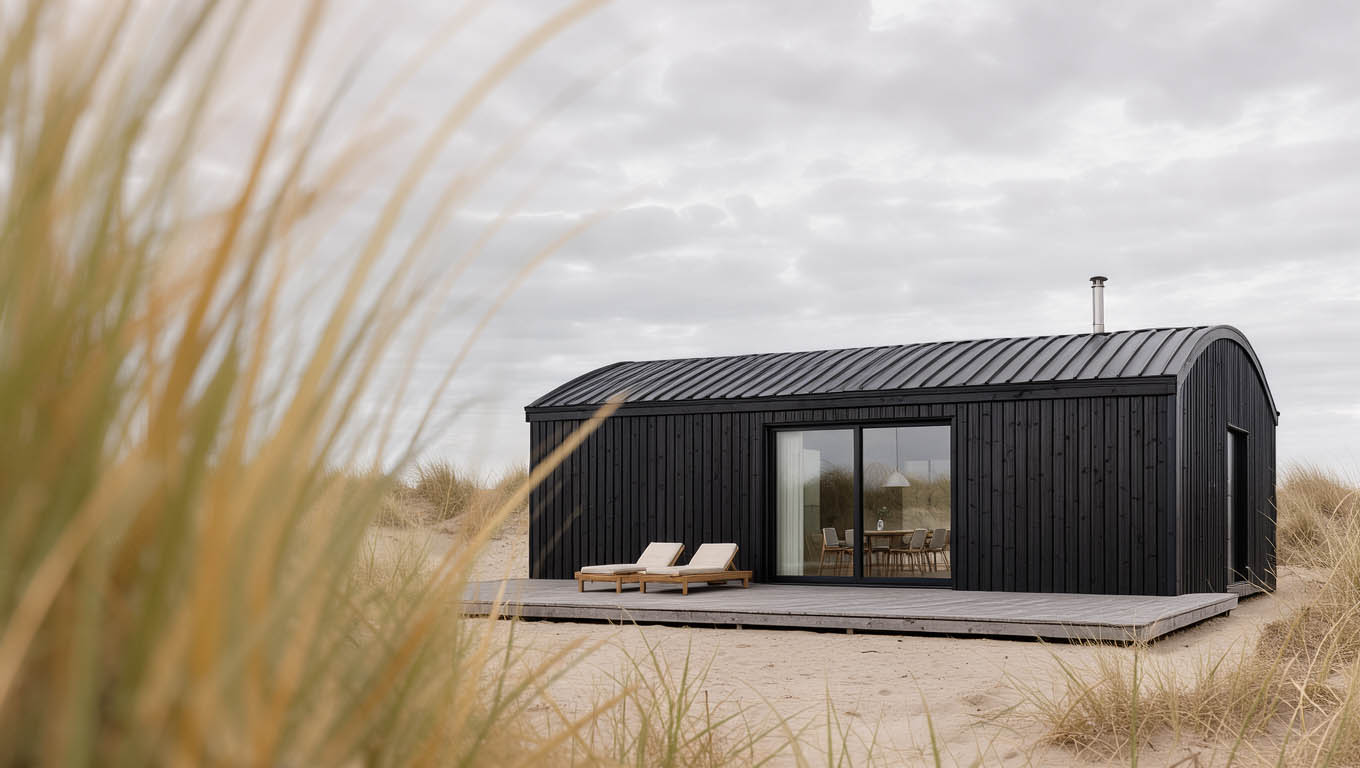
Flux.3 Klein · Q4_K_M + int8 · MacBook Air 16 GB · 12 steps · same prompt and seed as the opening image
The prompt behind the opening image
The image at the top and the image at the bottom of this page come from the same prompt with the same seed — once in BF16 on the MacBook Pro, once quantized on the MacBook Air. Here is the complete prompt: camera and lens as separate fields, ten elements with boxes, two interactions, light, atmosphere and style. With the same seed you can rebuild the image and then change it box by box.
Format:     1360 × 768 (16:9)
Seed:       703147524784380
CFG:        1.0 · euler · Flux2Scheduler

Pro:        BF16 · 16 steps    (image at the top)
Air:        Q4_K_M + int8 · 12 steps    (image above)
Show JSON prompt + expand
{
  "format": { "aspect_ratio": "16:9" },
  "camera": "low eye-level viewpoint, as if someone is peering through tall dune grass; two-point perspective; the house is slightly rotated, its front facade turned about 20 degrees toward the image center, so a narrow part of the house's right side wall is visible",
  "lens": "long lens with a wide aperture, very shallow depth of field: the grass close to the camera is heavily blurred, the house is in sharp focus",
  "elements": [
    {
      "id": "grass_fg_1", "rank": 1, "bbox": [0, 0, 1000, 360],
      "caption": "tall dune grass very close to the camera",
      "desc": "Tall golden dune grass blades directly in front of the lens, strongly out of focus, soft creamy blur, filling the left third of the frame from top to bottom."
    },
    {
      "id": "house_1", "rank": 1, "bbox": [420, 380, 780, 940],
      "caption": "a minimalist single-story holiday house",
      "desc": "A minimalist single-story house clad in dark, charred vertical wood planks, slightly rotated toward the image center, sharp and in focus."
    },
    {
      "id": "side_wall_1", "rank": 2, "bbox": [440, 860, 770, 940],
      "caption": "the right side wall of the house",
      "desc": "A narrow strip of the house's right side wall in dark charred wood, receding in perspective."
    },
    {
      "id": "roof_1", "rank": 1, "bbox": [420, 380, 510, 940],
      "caption": "a barrel-vaulted corrugated metal roof",
      "desc": "A shallow barrel-vaulted roof of dark corrugated metal, one continuous gentle arch from eave to eave, its curved end visible above the right side wall."
    },
    {
      "id": "chimney_1", "rank": 3, "bbox": [350, 790, 430, 810],
      "caption": "a slim stainless steel chimney flue",
      "desc": "A slim stainless steel chimney flue rising vertically from the right part of the curved roof."
    },
    {
      "id": "doors_1", "rank": 2, "bbox": [540, 560, 750, 700],
      "caption": "large glass sliding doors",
      "desc": "Large glass sliding doors with slim black frames in the front facade, revealing a dining table with chairs and a pendant lamp inside."
    },
    {
      "id": "deck_1", "rank": 2, "bbox": [750, 340, 830, 900],
      "caption": "a weathered gray wooden deck",
      "desc": "A weathered gray wooden deck along the house front, its edges converging slightly in perspective."
    },
    {
      "id": "loungers_1", "rank": 3, "bbox": [700, 420, 770, 540],
      "caption": "two sun loungers",
      "desc": "Two low reclining sun loungers of light wood with pale cushions, backrests slightly raised, side by side on the deck left of the sliding doors."
    },
    {
      "id": "sky_1", "rank": 2, "bbox": [0, 330, 520, 1000],
      "caption": "a cloudy overcast sky",
      "desc": "A soft cloudy overcast sky in light grays above the house."
    },
    {
      "id": "dunes_1", "rank": 3, "bbox": [800, 330, 1000, 1000],
      "caption": "pale sand and dune grass",
      "desc": "Pale sand and lower dune grass in front of the deck, gradually softening in focus toward the camera."
    }
  ],
  "interactions": [
    "a few blurred grass blades from the foreground cross into the frame toward the house, overlapping the left edge of the deck",
    "the overcast sky is softly reflected in the glass sliding doors"
  ],
  "light": "soft, diffused overcast light, even illumination, gentle shadows",
  "atmosphere": "calm, muted Nordic mood, a quiet observing glance",
  "style": "high-end architectural photograph, photorealistic, house tack-sharp, strong optical depth from the foreground blur"
}