Case Study · F1
Highland Cottage
From Blender skeleton to photographic result in four steps.
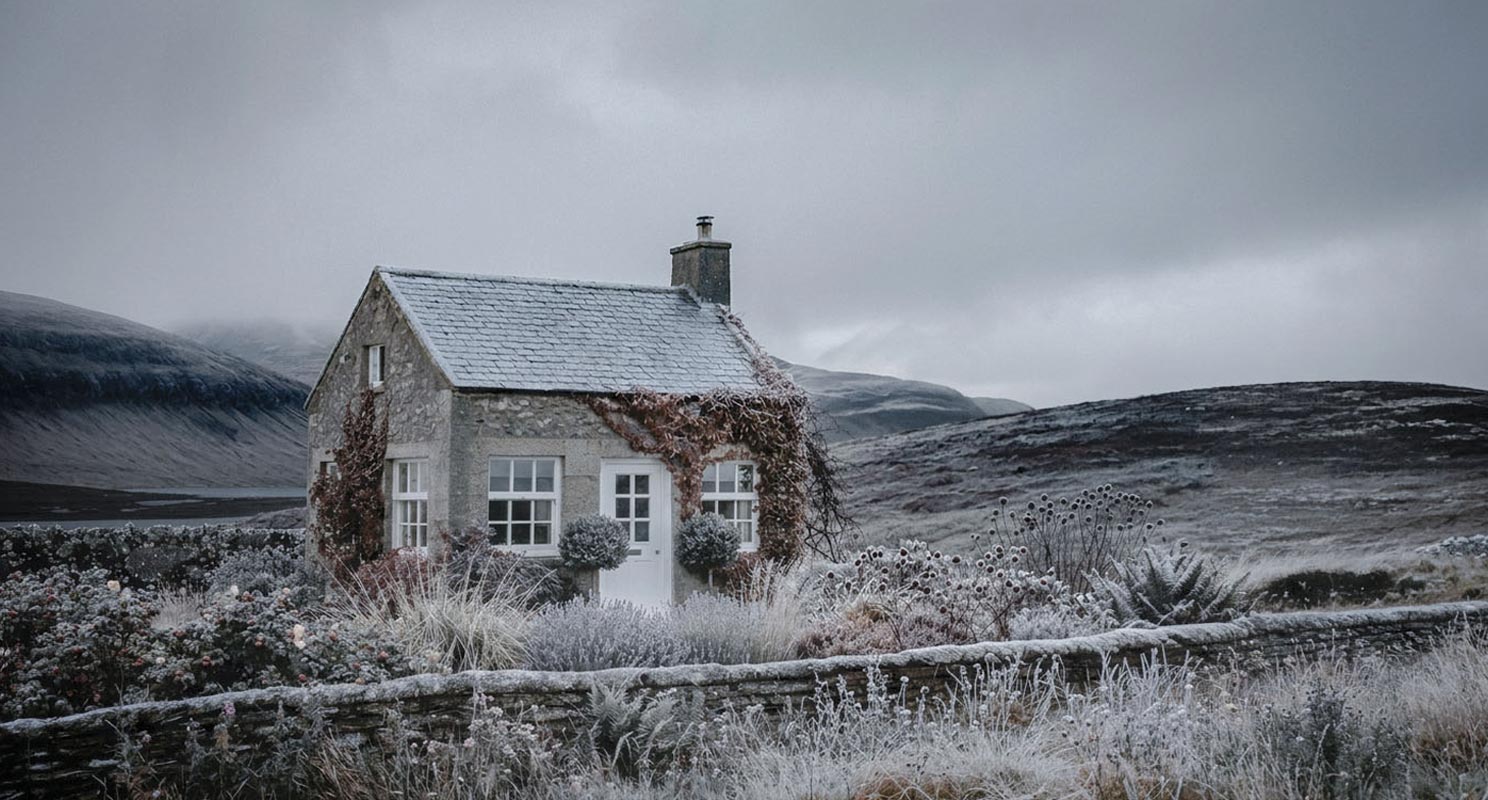
The final image
This case study documents a complete workflow — from the first Blender render to the final image. No elaborate setup, no optimized settings. A genuine first test with deliberately simple geometry. The result proves that the concept works, and that's exactly why it's documented here: as a traceable path with four clearly separated stages.
The through-line is the separation of deterministic and stochastic. What has to be fixed is built in Blender. What can be free is left to the AI — guided more tightly with each step.
Step 1 — Deterministic: Blender
Blender skeleton
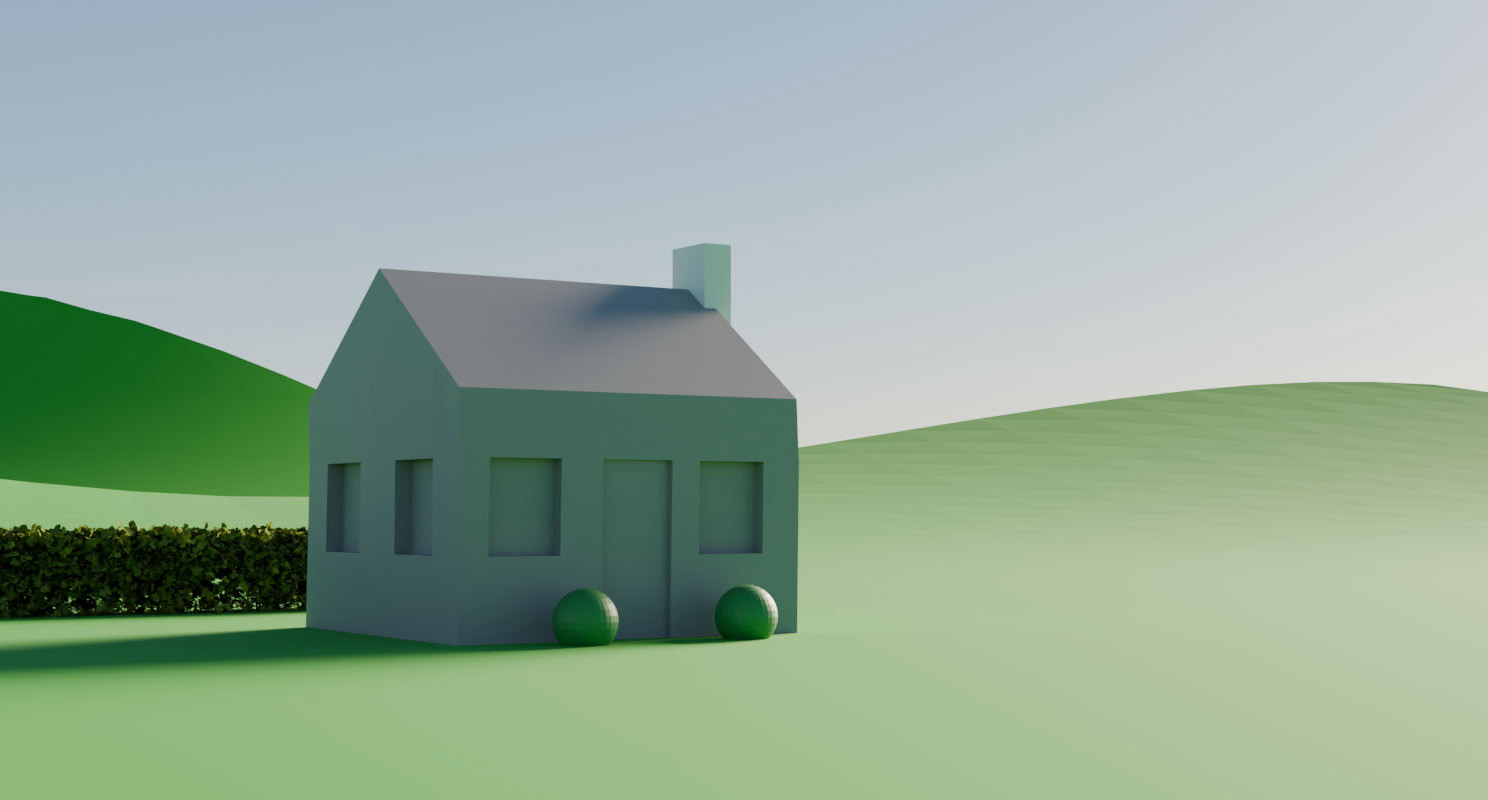
The Blender render shows what this workflow asks of Blender — and what it doesn't. Camera position, focal length, and proportions are precisely defined and reproducible. The house stands where it should. The hill, the hedge on the left, the chimney — everything is in place.
Materials, textures, and lighting are deliberately absent. The walls are grey surfaces, the two spheres by the door are placeholders only. This isn't an unfinished render — it's the division of roles: Blender delivers the geometry, not the image. The AI may interpret — but not recompose.
Step 2 — SDXL with ControlNet: the sparse base
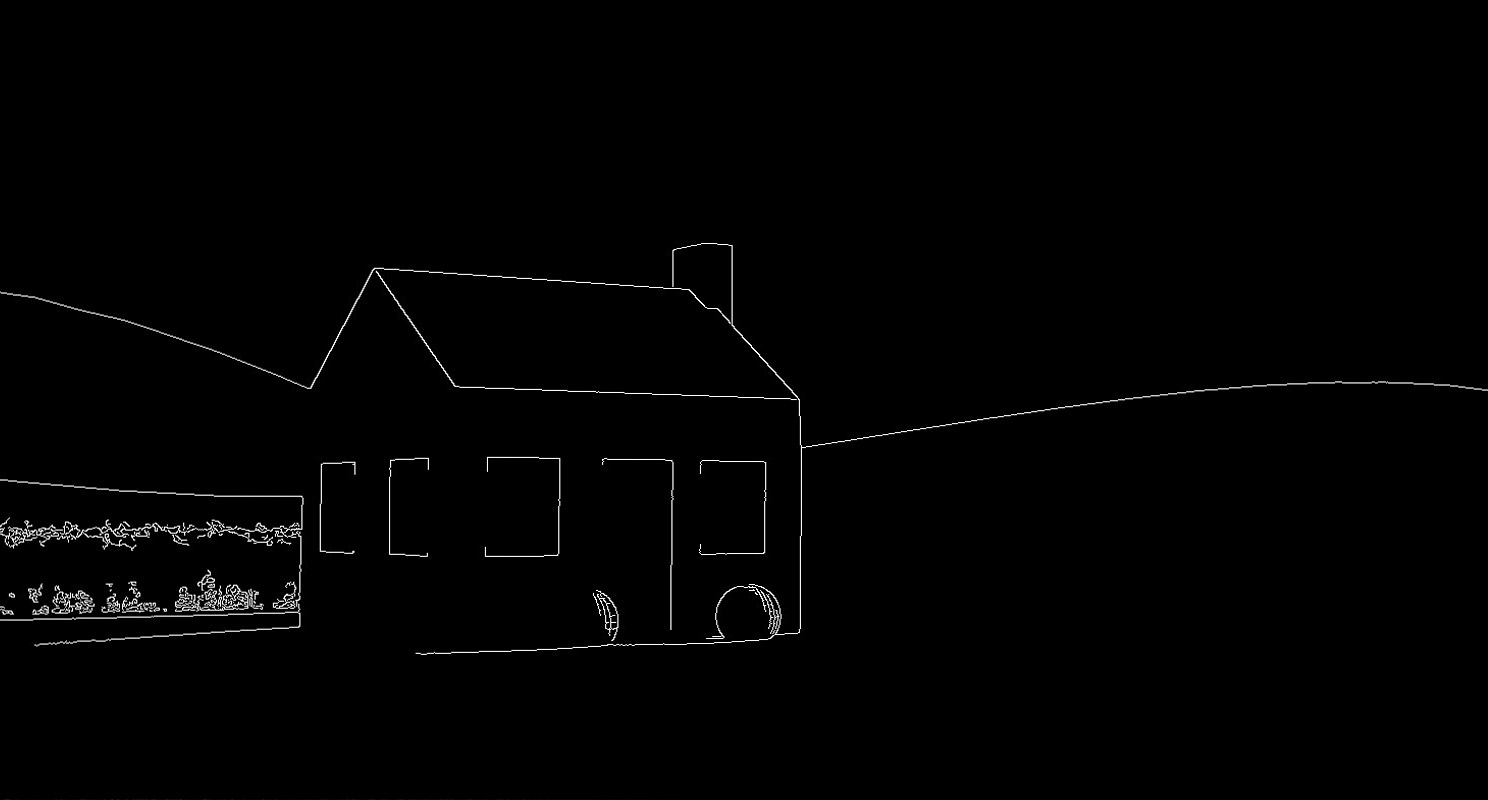
A Canny edge map is calculated from the Blender render first. It's the contract between geometry and model:
Canny edge map
A clean case: clear contours for the house, roof, windows, the hilline in the background. Only bottom left, at the hedge, does it get a little noisy — organic edges Canny can't resolve cleanly. Uncritical for this subject, because the architecture carries the image. (How badly texture-heavy surfaces can flood a Canny is shown in the food case study — here the geometry is the subject, and that's exactly ControlNet Canny's home territory.)
SDXL result
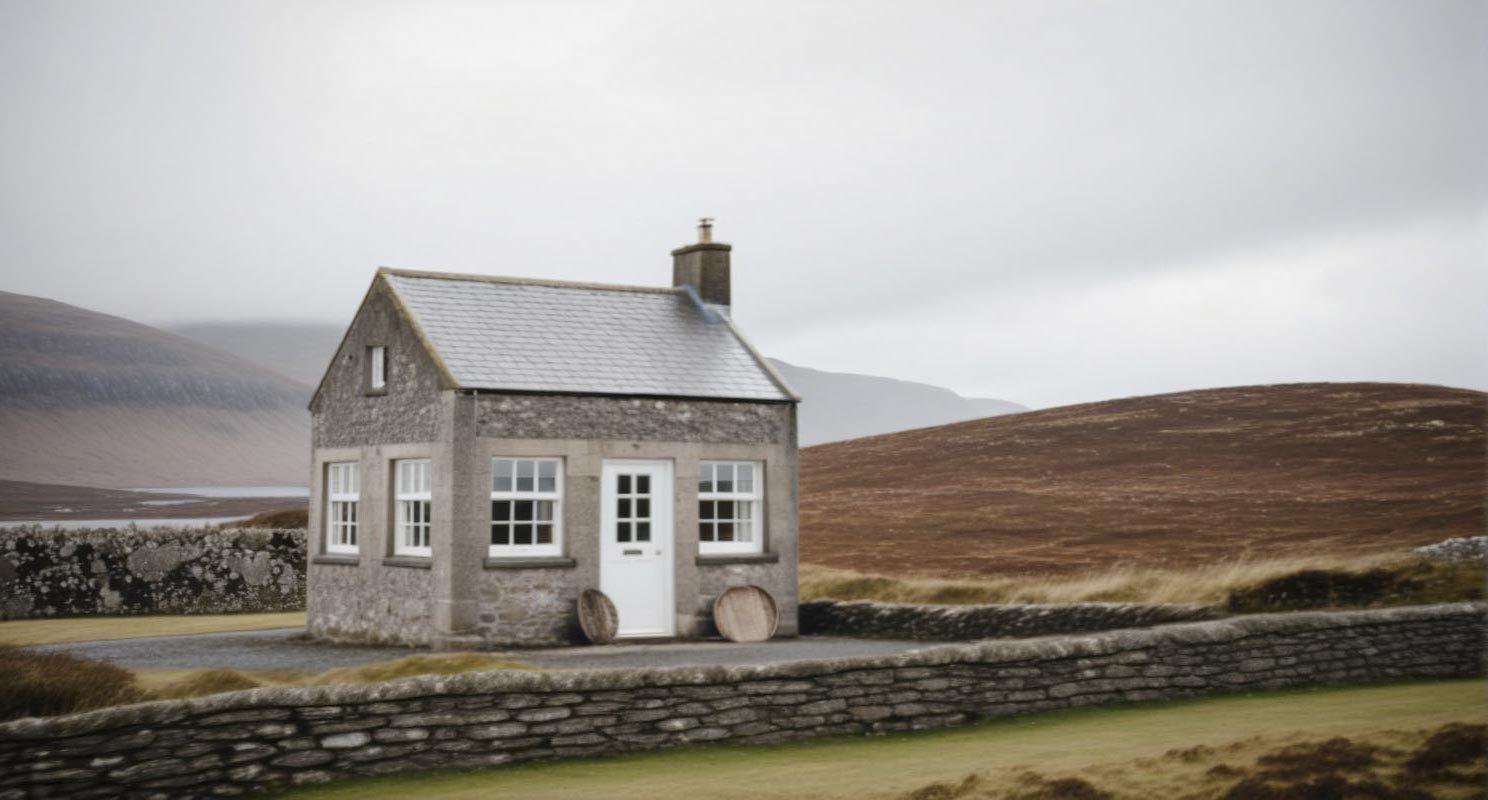
The first photographic pass, SDXL with ControlNet Canny. The result is sparse and honest: a grey stone house in the Highlands, slate roof, white door, moorland behind it and a loch on the left edge. No garden, no ivy, nothing embellished. The composition is exactly that of Step 1 — ControlNet held the geometry. The model added material, light, and atmosphere.
Two observations show where the boundary between deterministic and stochastic runs — and they show it from two sides.
First, the door: two round wooden discs stand there, reminiscent of whisky barrels. In Blender they were two spheres, boxwood placeholders. The model found the two round shapes in the Canny and gave them content. Where Canny specifies a form, it enforces the form — what becomes of it is the model's guess.
Second, the foreground: a dry-stone wall runs across the entire image. It didn't exist in the Blender render and wasn't in the prompt. SDXL placed it in the empty space on its own initiative. That's the other side of the same coin: where Canny specifies nothing, the model fills the space at its own discretion. Form is enforced by Canny — the empty remainder is negotiated by the model with itself.
For this image, the invented wall is a lucky find; it fits. But it's the one place in the image where the composition is not geometrically secured — its position depends on the model's chance, not on Blender. Which is exactly why it's deliberately written into the prompt in Step 3: what began as an accidental gift becomes a fixed specification.
SDXL — Positive prompt
(solitary stone cottage in the Scottish Highlands:1.2), small traditional croft house, rough-hewn grey granite blocks, weathered stone walls, dark slate roof, stone chimney stack, (crisp white painted front door:1.3), (bright white painted window frames:1.3), rolling moorland hills, russet heather, ochre grass, distant loch on the left, (heavy overcast sky, diffuse silver-grey light:1.1), cold damp highland atmosphere, editorial medium format photography, film grain, muted earth tones, cinematic color grading, ultra photorealistic, highly detailed, 8k
SDXL — Negative prompt
cartoon, illustration, painting, drawing, sketch, 3d render, cgi, low quality, low resolution, jpeg artifacts, oversaturated, hdr, blue sky, sunny, harsh shadows, lens flare, deformed architecture, warped windows, crooked lines, extra windows, extra chimney, people, person, animals, cars, modern buildings, power lines, text, watermark, signature, logo
| Model | Juggernaut XL |
| ControlNet | controlnet-canny-sdxl.safetensors |
| ControlNet strength | 0.85 |
| Canny low / high | 41 / 150 |
| CFG | 7.0 |
| Steps | 25 |
Step 3 — Refinement with Flux
Flux.1 dev · img2img · autumn variant
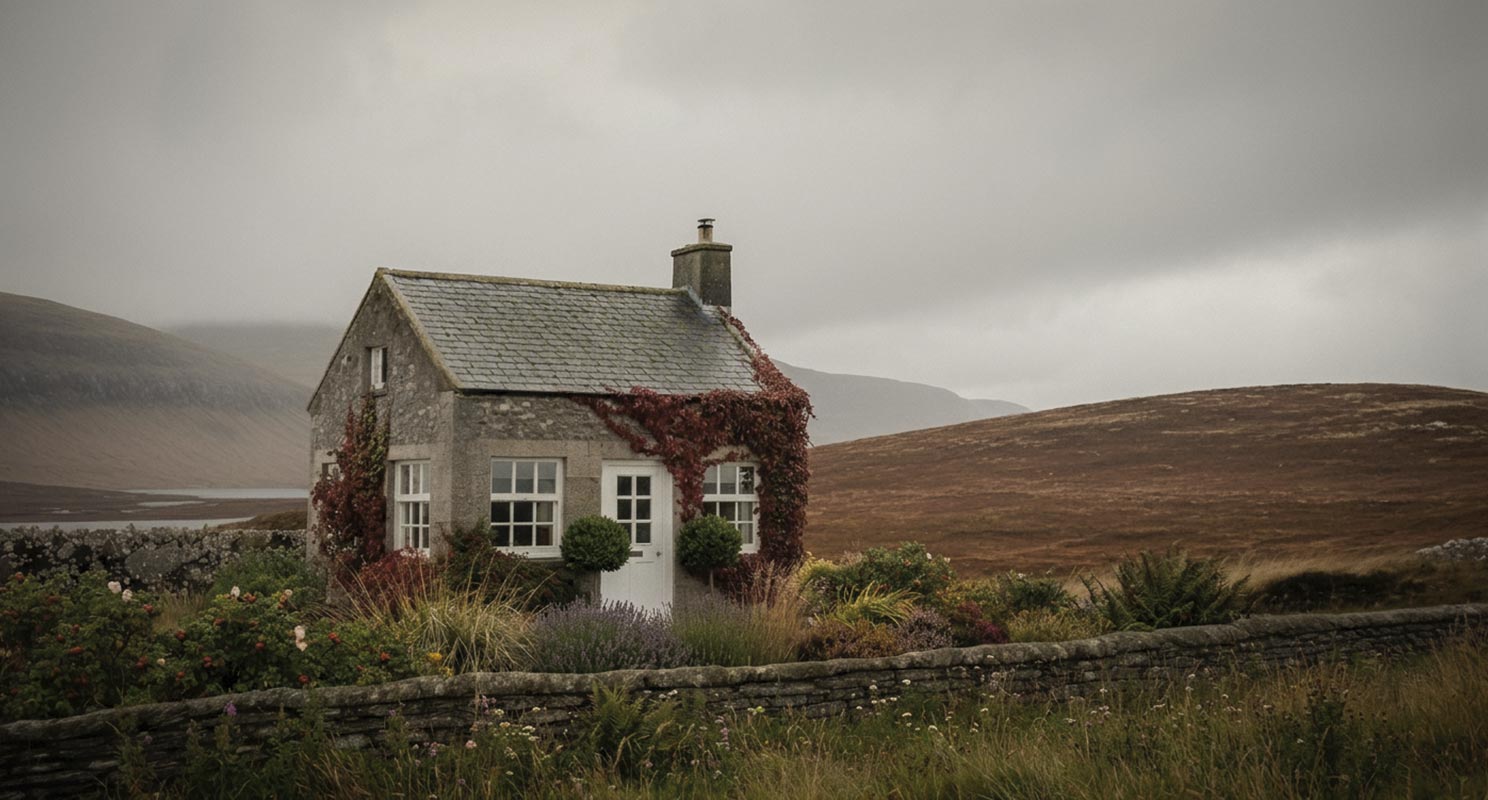
What SDXL delivers as a base, Flux takes to a finished photograph. This is where everything the sparse version lacked comes in: ivy and Virginia creeper in deep autumn reds across the facade, a cottage garden of lavender, grasses, and roses, the two boxwood spheres flanking the white door. The atmosphere deepens — heavy cloud light, muted earth tones.
A change of mechanism worth naming: this step didn't run through ControlNet but as img2img in a separate ComfyUI workflow — no Blender, no Canny, just the SDXL image from Step 2 as reference. What holds the composition here is no longer the geometry edge but the low denoise value: img2img stays close to the source as long as you don't let it noise too heavily. The phrase "Preserve exact composition" in the prompt supports what the moderate denoise already does.
House, wall, hills, the loch on the left — everything stays in place. What changed is only the visual execution. This is the point where the workflow shows what it can do: photographic materiality, without losing the image architecture.
Flux t5xxl — prompt (autumn)
Preserve exact composition, camera angle and framing of the reference image. A solitary stone cottage in the Scottish Highlands, late autumn afternoon. Rough-hewn grey granite blocks, weathered mortar joints, dark slate roof with moss patches, square stone chimney stack. Two clipped boxwood spheres flank the white front door. Ivy and Virginia creeper in deep autumn reds partially cover the facade. Cottage garden: lavender, ornamental grasses, wild roses with rosehips, heather, ferns at the base of the walls. Dry-stone fieldstone wall across the foreground, wildflowers and long grass at its base. Rolling moorland hills behind — russet heather, ochre grass, dark peat. Distant loch left. Heavy stratocumulus clouds, diffuse silver-grey light, imminent rain. Editorial medium format photography, film grain, muted earth tones, cinematic color grading, ultra photorealistic, 8K.
| Model | Flux.1 dev (fp16) |
| Method | img2img (separate ComfyUI workflow) |
| Reference | SDXL image from Step 2 |
| Denoise | [to be added after reproduction run] |
Step 4 — Season change with Nano Banana Pro
The final step is a shift in perspective — not the camera's, but the season's. The same house, the same composition, but winter: hoarfrost on wall and garden, the autumn reds faded to brown stems, a cold silver light across the whole scene.
This one variant wasn't generated locally but with a high-end cloud model (Nano Banana Pro) — a single render. This is a deliberate exception and I want to name it openly: the workflow otherwise lives on local inference and small models. For a controlled season change with composition preserved, a large cloud model delivers a result here that doesn't justify the effort of a local rebuild. One render, one exception, made transparent. More on the thinking behind that on the position page.
Prompt — season change (winter)
Maintain exact composition, camera angle and framing from reference image 1. Do not mirror, rotate or reframe the scene. Apply the winter atmosphere, frost texture, color palette and lighting shown in reference image 2 to the entire scene. SEASON CHANGE: deep winter. The climbing vines on the facade are bare, brown branches with no leaves. The garden plants are dormant — frost-covered dead grasses, frozen lavender stems, dried seed heads coated in rime, exactly like reference image 2. The slate roof and dry-stone wall are dusted with frost. The moorland hills are darker, desaturated, with frost in the shadowed folds, matching reference image 2. Heavy overcast sky, flat cold light, slight mist near the horizon. Editorial medium format photography, film grain, muted cold winter palette, cinematic color grading, ultra photorealistic, 8K.
| Model | Nano Banana Pro (Cloud) |
| References | Image 1 (composition) · Image 2 (winter atmosphere) |
| Renders | 1 rendering |
Nano Banana Pro (Cloud) · season change · winter variant
What the test proved
Four steps, four tools, one image — and the composition from Step 1 stands unchanged at the end. That's what's interesting about this case study: it's not a single model that makes the result, but the clean handoff from one to the next. Blender fixes what has to be fixed. SDXL, Flux, and in exceptional cases a cloud model fill what can be free — each step guided more tightly than the one before.