Case Study · Food
Granola Bowl
Blender geometry, ControlNet Canny, Flux.1 dev — and why the real tool for a convincing food shot is the material in Blender.
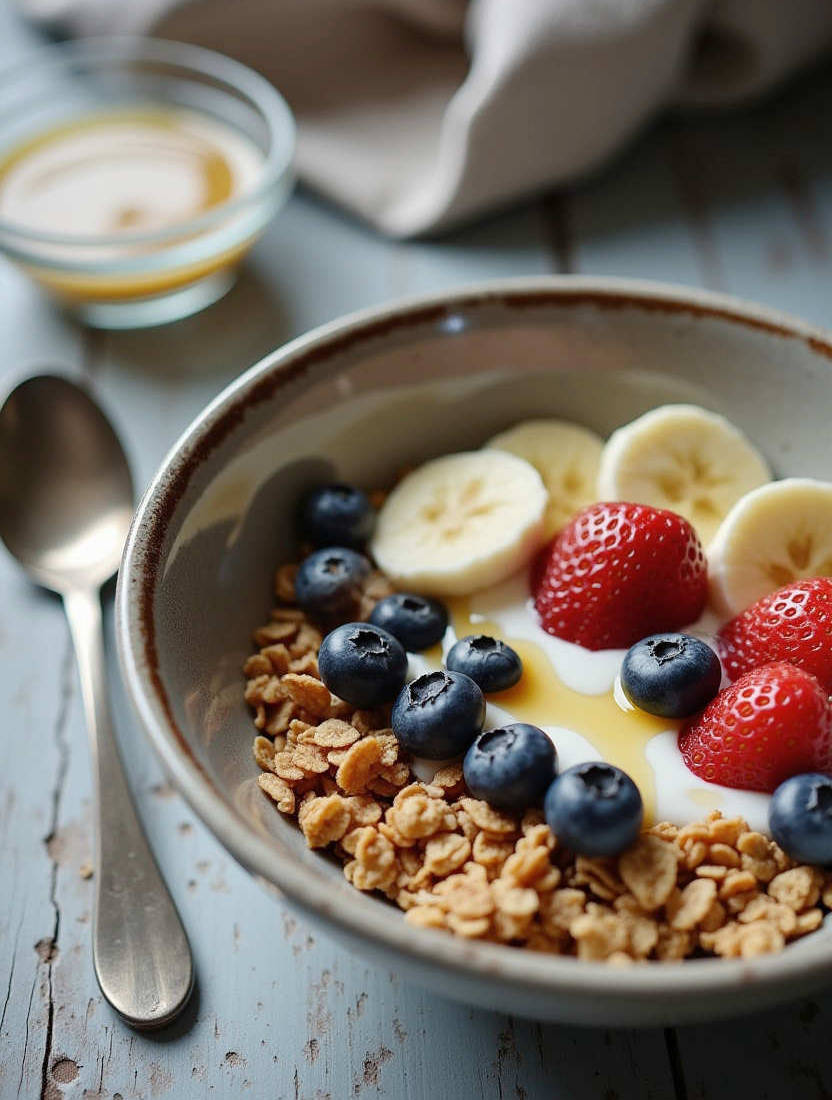
Flux.1 dev · ControlNet Canny · minor brightness adjustment in Affinity
Most examples on these pages are built on objects with clear geometry: rooms, buildings, products. That's exactly where ControlNet Canny excels: the Blender geometry is the subject, Canny locks it in, the model adds material and light on top. Deterministic form, stochastic surface. A clean division of labor.
Food is different.
The primary criterion for a food shot is: does it look natural and genuinely appetizing? This is where nearly every rendering falls flat. Despite sophisticated materials and complex subsurface parameters, the objects usually look unappetizing and anything but fresh. This is exactly where AI image generation takes a significant step further.
Writing this article reminded me a little of the "hero's journey" — a big goal, failure halfway through, and a fortunate arrival.
I developed the prompt in ComfyUI without Blender and ControlNet first, to get a feel for which descriptions work for objects, surfaces, and lighting atmosphere.
A bowl of granola presents two problems that don't arise with most subjects. First: the actual subject — the food — doesn't exist in your Blender scene at all. The bowl is an empty shell. Second: the materials that make a bowl look attractive are texture-heavy. Speckled ceramic, weathered wood, a rough linen napkin. And those textures sabotage Canny.
A Canny that isn't a Canny
The first attempt used the materials I had set up for the scene in Blender: speckled ceramic bowl, wood table with fine grain. Canny at defaults, thresholds 50 / 150. The result was poor — a half-empty bowl, a little fruit, and strange speckles reminiscent of poppy seeds. Almost nothing from the detailed prompt came through.
The error is visible in the Canny image: this isn't an edge map. It's a noise field. Two sources flood it. The entire background is covered in fine lines — the wood grain, which Canny reads as thousands of tiny edges. And the interior of the bowl is covered in white dots — the speckled glaze, also read as edges. What actually matters — the bowl rim and spoon silhouette — drowns in all of it.
That explains the weak result. At high strength, ControlNet tells the model: structure must go here, and here, and here, everywhere. The background is nailed down by the grain noise. And the bowl interior is defined by the speckles as a filled, textured surface — even though it's empty. The model simply can't fill the bowl freely. The geometry says: empty, dotted bowl in a noisy environment.
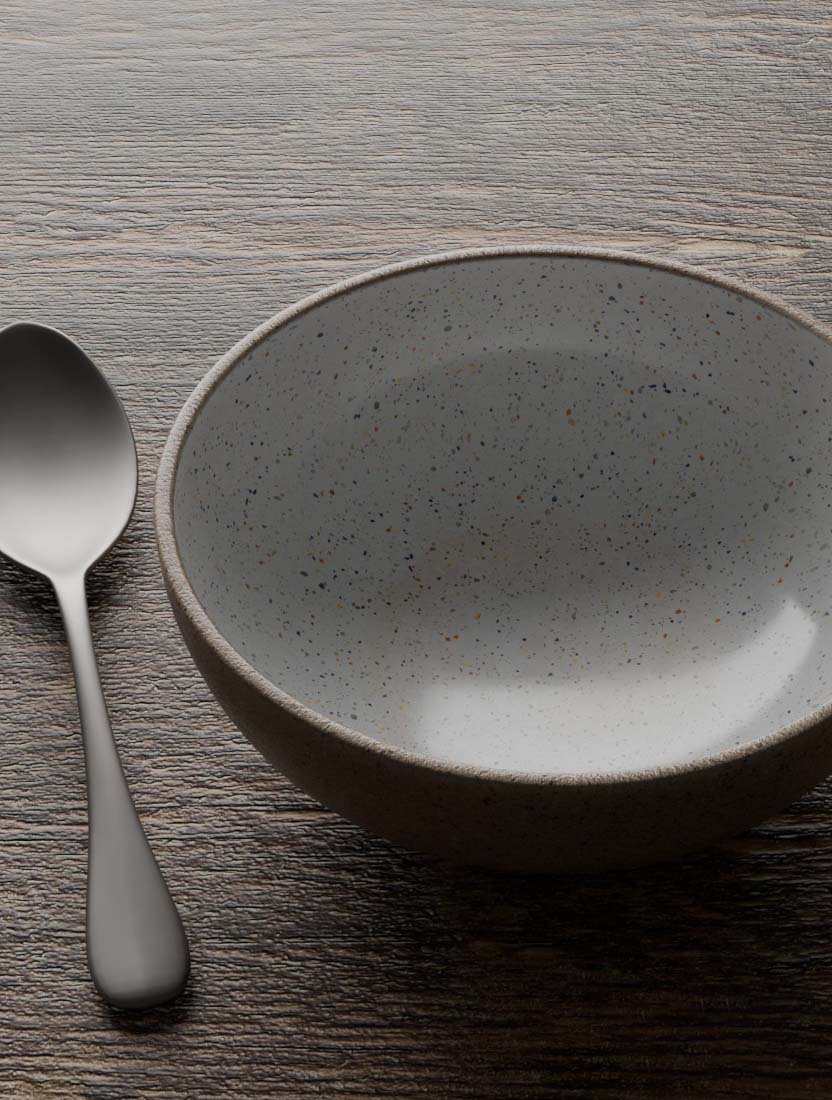
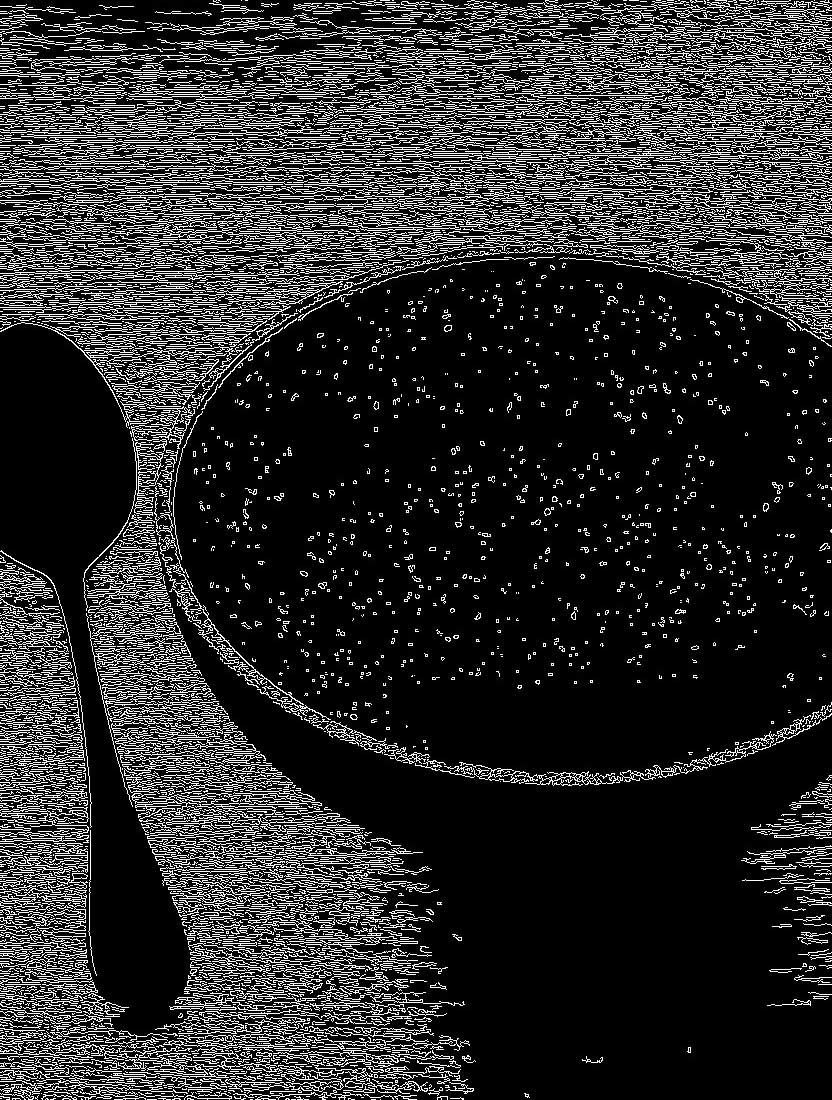
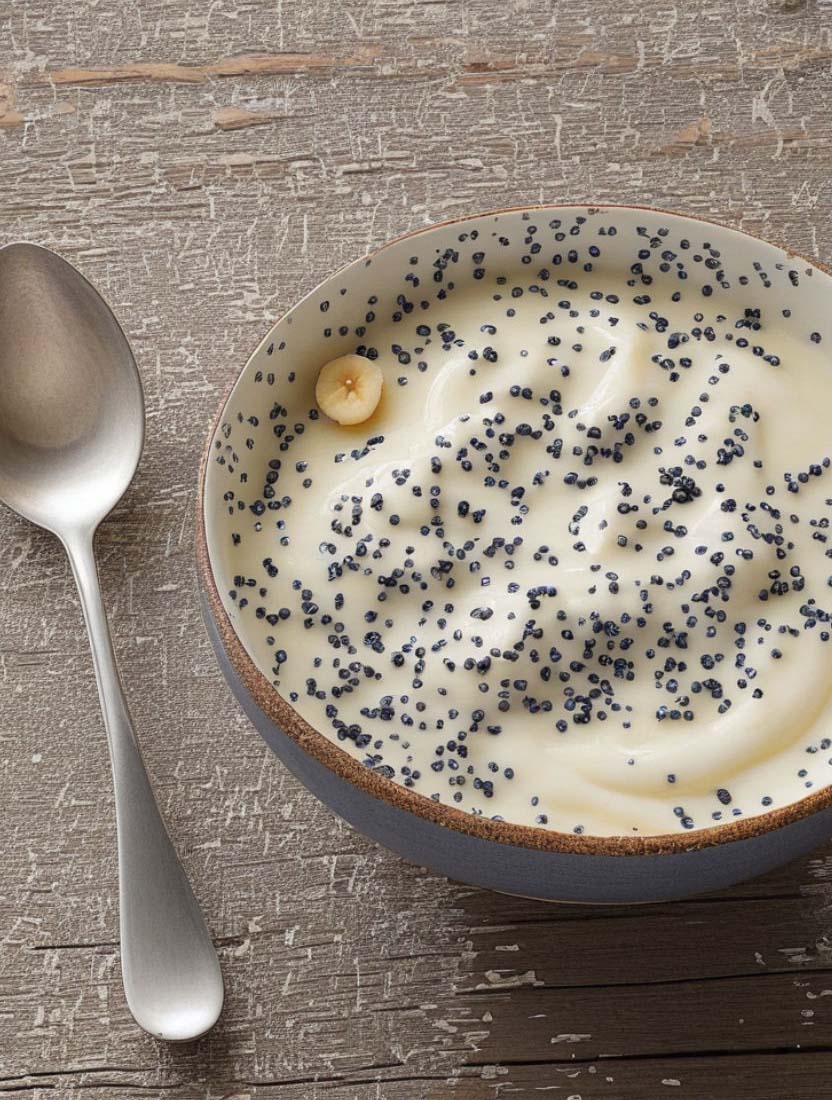
Blender render · Canny image · result — first attempt with speckled ceramic and wood grain
The lever: separating materials at the source
There are two ways to fight Canny noise. You can filter it downstream by raising the thresholds — low-contrast micro-edges drop out. That works, and it's the fallback when you can't change the scene.
The cleaner approach is to avoid the noise at the source. In this run the thresholds stayed at 50 / 150 — unchanged. Only the materials changed: the speckled glaze out, a smooth, matte, neutral bowl in. The fine wood grain replaced by a material with clear floorboard joints instead of dense surface texture.
The result, with identical Canny settings: same subject, same thresholds. Only the materials are different. The noise field has become an edge map: the bowl rim as a clean ellipse, the spoon silhouette, the rim of the honey dish. And the crucial point — the bowl interior is black. Not a single speckle left. That's exactly where the model can now place granola, yogurt, and fruit. Nothing forces an empty surface on it anymore.
This is the core lesson, and it's model-agnostic: Canny is calculated before any model renders. Keep the control surfaces smooth and neutral. Texture is what the model should generate — stochastically, from the prompt. It doesn't belong in the geometry channel.
A side effect makes this concrete. A completely empty surface gives Canny nothing, and the model loses its sense of perspective. Hence the floorboard joints: a few clear, long lines in the direction of the vanishing point define the table plane and the perspective anchor. They survive even high thresholds because they're high-contrast and long. The fine grain, on the other hand, can disappear. You control the geometry of the surface; you leave the texture as a material to the model.
The prompt: why Flux wants full sentences
The prompt is just as decisive for a food shot — and Flux requires something different here than SDXL.
SDXL works with comma-separated keywords. Flux doesn't. The T5XXL encoder responds poorly to keyword stacks and well to descriptive sentences. More on the separate content architecture of CLIPTextEncodeFlux in 2.4 — Prompt Architecture — what counts here is the result: a food subject doesn't become appetizing through tags, but through the description of sensory surface qualities. Moisture. Gloss. Freshness.
The prompt for the final result:
Flux t5xxl — prompt
A ceramic bowl with a speckled glaze sits on a rustic, weathered gray wood table, filled with granola, creamy yogurt, fresh blueberries, banana slices and strawberries. Honey is drizzled over the yogurt, catching the light with a subtle gloss. A vintage silver spoon rests on the table to the left of the bowl, and a folded linen napkin lies loosely in the background. Soft, diffused natural light enters from the upper left, creating gentle highlights on the berries and yogurt without harsh shadows. The composition is shot from a 45-degree angle with an 85mm lens, sharp focus on the bowl, soft background blur. Editorial food photography style, photorealistic.
Notice what's happening here. Not "yogurt" but creamy yogurt with honey running into it and catching the light. Not "berries" but fresh berries with soft highlights. Camera and lens are written as a sentence, not abbreviated as tags: 45-degree angle, 85mm, sharp foreground, soft background. That's the language Flux understands.
The settings
The first Flux run was too hard. ControlNet strength 0.7 with the InstantX Canny adapter pushes edges through so forcefully that the granola looked dry and crumbly — forced edge structure instead of soft material freedom. Flux holds the composition at significantly lower strength because the base model is geometrically more stable than SDXL. So: lower the strength, raise the guidance:
| Model | Flux.1 dev (fp16) |
| ControlNet | flux-canny-instantx.safetensors |
| ControlNet strength | 0.4 |
| Steps | 20 |
| Guidance | 5.0 |
| Canny low / high | 50 / 150 |
| Seed | 2147483647 |
The reduced ControlNet strength is the main lever here. It gives the model the freedom to render surfaces creamy and glossy instead of forcing hard structure at every edge. The higher guidance ensures the described surface qualities come through more clearly. Too high and it becomes plastic-looking — 5.0 was the workable value for this subject.
The result
This holds up next to professional food photography. The yogurt reads as its own component — creamy, with the honey running into it. The granola looks crunchy rather than dry. The berries are plump. The peeling paint on the wood, the soft depth of field, the honey dish in the bokeh — a fully composed shot. Minor brightness adjustment in Affinity, otherwise straight out of Flux.
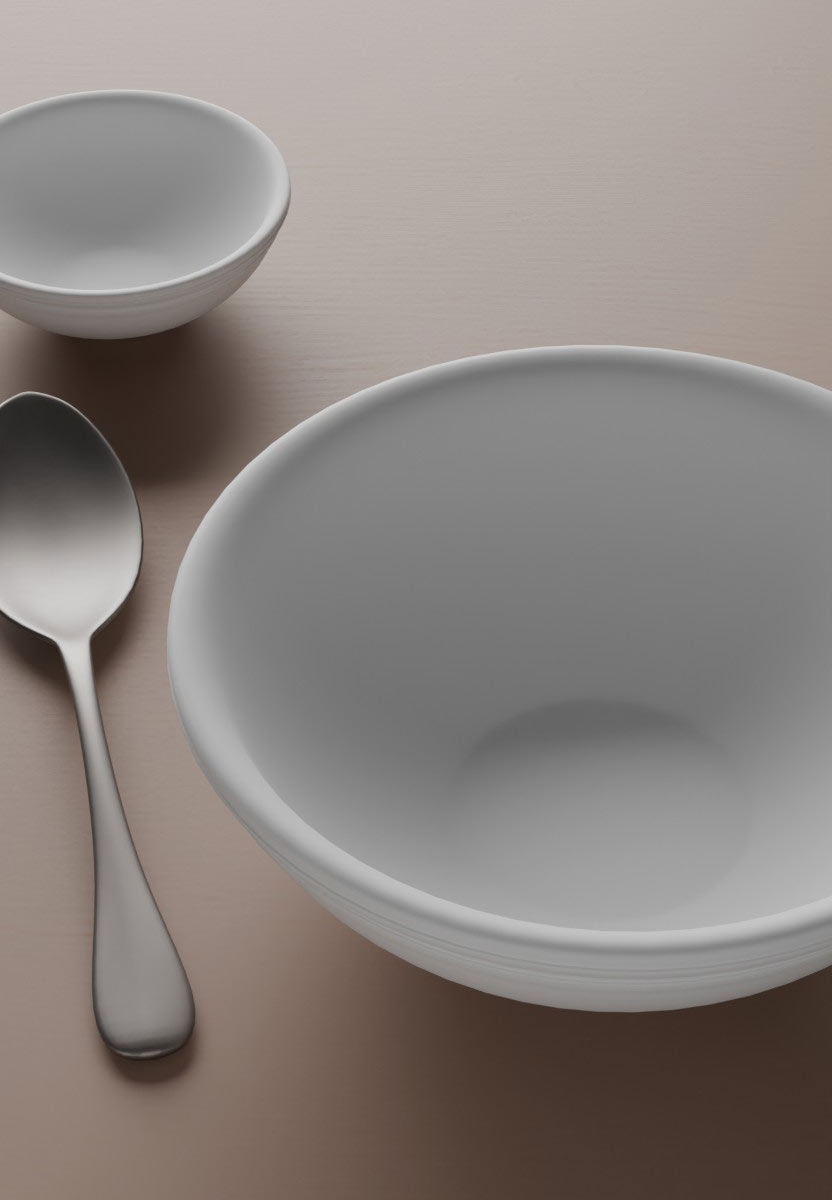
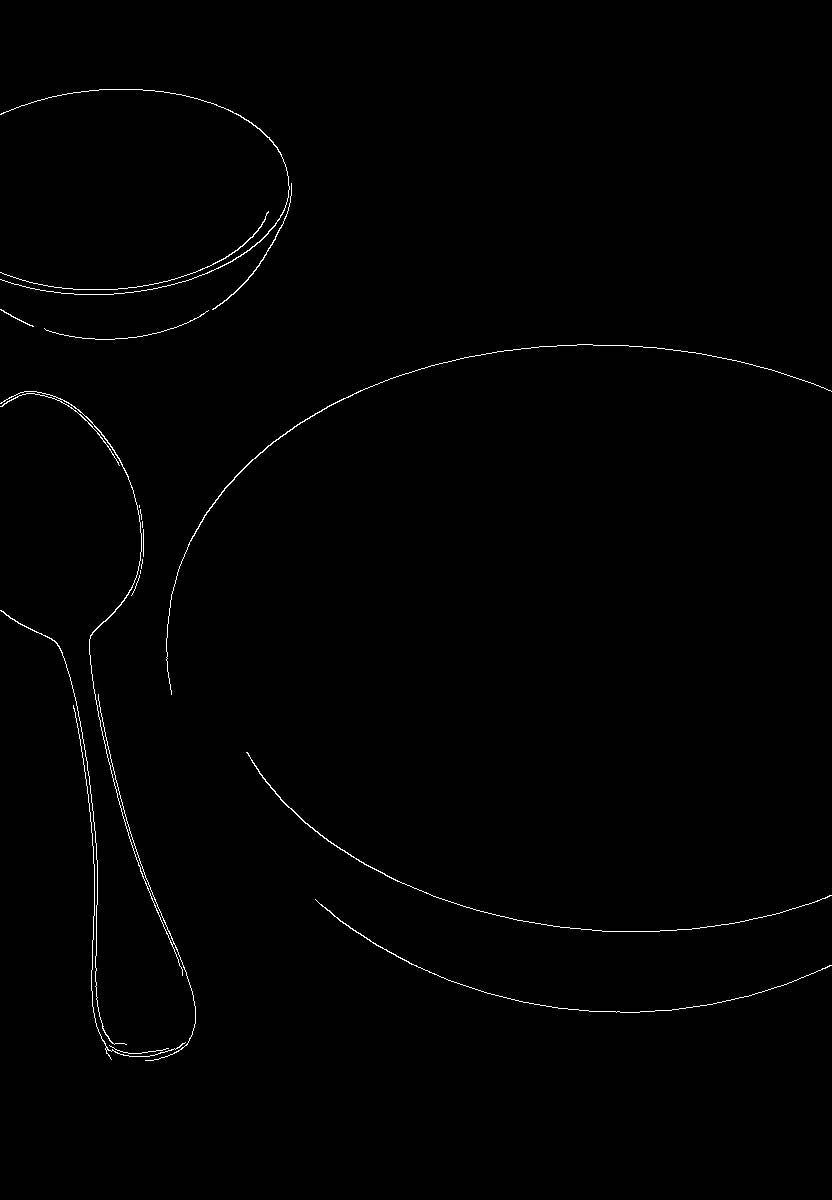
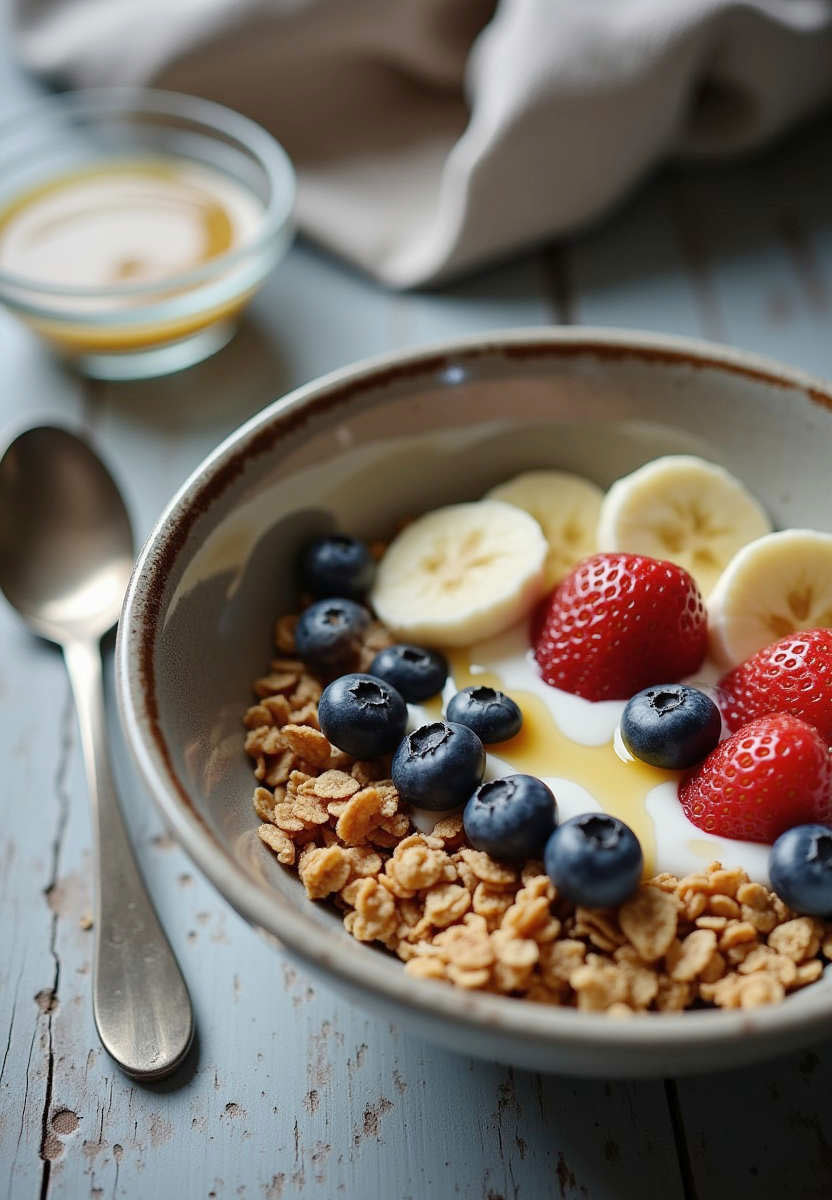
Blender render · Canny image · result — second attempt with neutral materials, identical Canny settings
One decision is worth mentioning because it has nothing to do with technique. The prompt originally included coconut flakes. They didn't look appetizing. The solution wasn't to force them to look better through weighting — the solution was to remove them. Leave out what doesn't contribute. No parameter in the world replaces that judgment.
Takeaway
For this subject — organic, soft, moist — Flux delivers more convincing materiality. That's not a blanket statement. For edge-heavy subjects with clear geometry, SDXL matches it or is faster. Food like this is Flux's home territory; a piece of furniture or a façade may turn out differently. The question is never "which model is better" but "which model for which subject."
But the real lesson comes before the model choice. It's in the two Canny images. Same scene, same thresholds, only different materials — and noise becomes contour. Prepare the reference. Separate what is deterministic from what should be stochastic. Then the technology works for you, not against you.