3D & Blender · Fundamentals
Blender as a composition tool
Why the focus shifts — and what stays.
Blender can do a great deal: photorealistic rendering, physically correct light, elaborated materials. All of that has its place — the chapters on rendering, shaders, and lighting go into it in depth. This article takes a different perspective: Blender not as a renderer, but as a composition tool in the AI workflow.
Anyone using Blender in the context of RAY-L starts thinking differently. Not because materials and light become unimportant. But because the focus shifts — from visual elaboration to spatial decision. From "what does it look like" to "where is it, how big is it, from what perspective am I seeing it."
That's the difference between Blender as a renderer — and Blender as a composition tool.
What composition means in Blender
In photography, composition is the art of deciding what goes into the frame — and what doesn't. Where does the object stand? What focal length do I choose? What position does the camera take? What vanishing lines emerge? What's sharp, what's blurred?
In Blender, these aren't aesthetic decisions — they're mathematically precise definitions. A camera at 85mm focal length, 1.20m height, 3m distance from the object: that's an exact spatial situation that can be reproduced at any time. On any computer, in any Blender version, a year from now just as it is today.
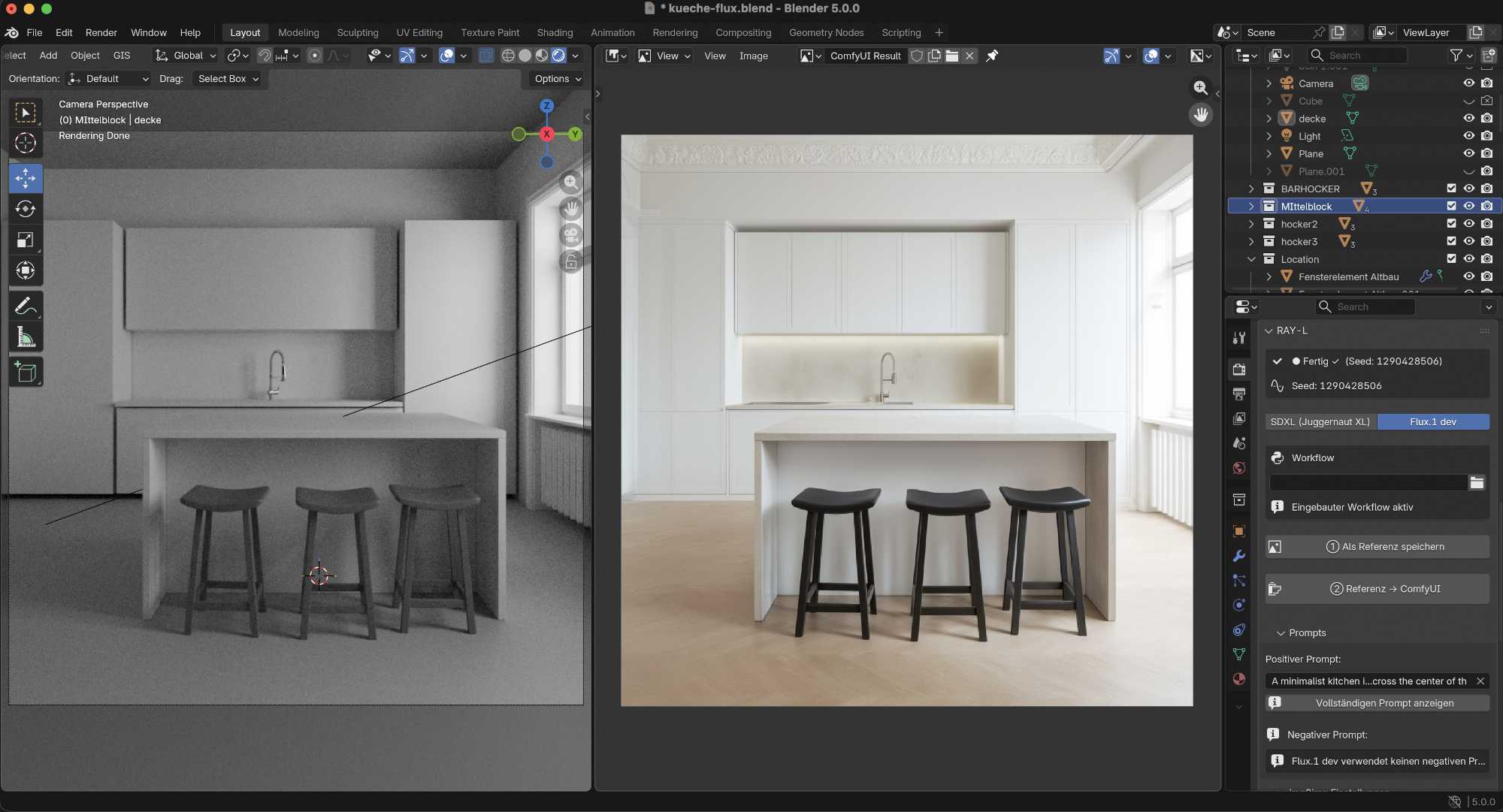
That's Blender's first and most important contribution in the RAY-L workflow: not the finished image — but the binding spatial decision that ControlNet Canny passes to the AI as an edge structure. The AI knows where things are. It interprets what they look like — but not where they stand.
What shifts
In the classic CGI workflow, Blender is responsible for everything: geometry, materials, lighting, rendering, post-production. The effort is distributed evenly — or unevenly, depending on the project. Often most of the time goes not into composition but into elaboration: textures that look convincing, light that falls naturally, details that bring an image to life.
In the RAY-L workflow, the AI takes over a large share of this elaboration work. Material feel, lighting mood, atmospheric details — these are AI strengths that come from millions of training images and that no renderer can reproduce in this form.
What does that mean for Blender? The focus shifts to what only Blender can do and what must not be handed to the AI: the precise spatial definition of the scene. Camera. Geometry. Proportions. Object placement. Scene construction.
That doesn't mean material knowledge becomes superfluous. Someone who understands how PBR materials work, who knows what a shader does and what it doesn't — also better understands what they're handing to the AI and why. The foundation remains important. But the emphasis is no longer on fully elaborating every surface.
What stays — and why
Geometry and scene construction remain central. Anyone who doesn't understand how to build a scene spatially, who doesn't know camera parameters, who can't control proportions — cannot steer the RAY-L workflow. The geometry is the foundation everything else builds on.
Camera and perspective become even more important. In the classic workflow, a good rendering can partially compensate for a weak composition. In the RAY-L workflow it can't — the composition is the input. What sits wrong in Blender sits wrong in the result.
Rendering and materials remain relevant — as a foundation for understanding and for projects that don't require an AI workflow. Someone who understands how an unbiased renderer calculates light also understands why the AI approaches it differently — and what's gained and what's lost in the process.
Lighting works differently in the RAY-L workflow than in classic CGI. The lighting in Blender indirectly influences what ControlNet Canny sees — shadow areas yield fewer edge data points, lit areas yield more. The spatial distribution of light and shadow therefore shapes the structure of the ControlNet input. The actual lighting mood however — color temperature, atmosphere, quality of the light, whether it reads as warm or cold, hard or soft — the AI interprets entirely from the prompt. The foundational understanding of light remains important: not to fully light the scene, but to understand what structural information Blender is passing to the AI.
Textures and mapping gain a new function — and remain indispensable because of it. In the classic CGI workflow, textures serve visual elaboration: what does a surface look like, what color, what roughness, what sheen. In the RAY-L workflow they additionally serve as structural information for ControlNet.
An example: a tiled floor without any texture in Blender is an empty surface for ControlNet Canny — no edges, no structure, no information about tile size or laying pattern. The same surface with a simple tile texture gives Canny clear edge data: grout lines, size, repeating pattern. The AI can derive from this how large the tiles are and how they're laid — without the floor geometry needing to be subdivided.
That means: selective texturing in Blender — not for the final visual result but as structural information for ControlNet — is a distinct work step. And mapping knowledge is decisive: how large is the tile relative to the room, how is the UV mapping set, what's the texture scale. Understanding this lets you tell the AI precisely what it should see — and what it's free to interpret.
A new perspective on familiar tools
Anyone reading this chapter's content with the RAY-L workflow in mind will weight some things differently than before.
Less time on material libraries. More time on camera decisions. Less effort on complete lighting setups. More care for clean geometry that gives ControlNet good edge data.
That's not a loss. It's a relief — and at the same time a sharpening. Blender becomes the tool it always was photographically: a means to make spatial decisions with precision. The visual elaboration is increasingly handled by the AI.
Photographing without a camera. With Blender as tripod and viewfinder. With the AI as light and atmosphere.